Storefront rentals

Rental pricing with daily, weekly and monthly rates

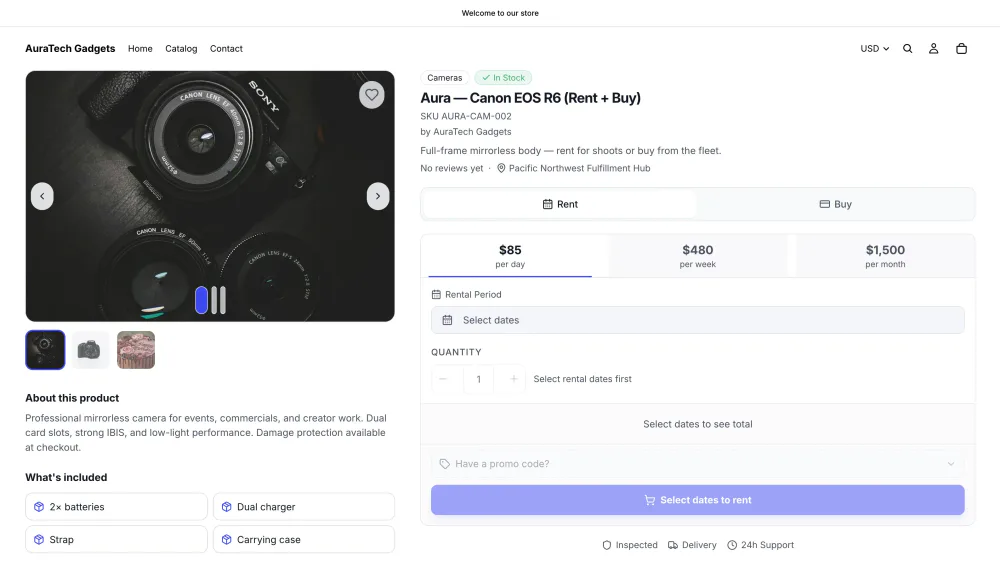
A camera at $85 a day shouldn't cost $595 for a week, and shoppers shouldn't have to email to ask. Set a daily, weekly and monthly rate once, and Rental Suite applies the right one to every range and shows the full price before checkout.

Rent tab on a camera product page with $85 per day, $480 per week and $1,500 per month side by side

01See it in action

See rental pricing in the admin

A short walkthrough in the Rental Suite admin, with voiceover. It plays muted; press Play with sound to hear it from the start.

Read the setup guide

02Overview

Rental pricing in Rental Suite

Rental pricing in Rental Suite comes from three numbers on each product: a daily rate, an optional weekly rate and an optional monthly rate. Shoppers see them side by side on the Rent tab, pick their dates, and the app works out which rate applies and what the rental costs.

The same rates drive New Booking in the admin, so a quote on the phone matches the website. Security deposits, damage protection and promo codes each keep their own line, so a customer can see what's rent, what's refundable and what's optional before they pay.

Set daily, weekly and monthly rental rates

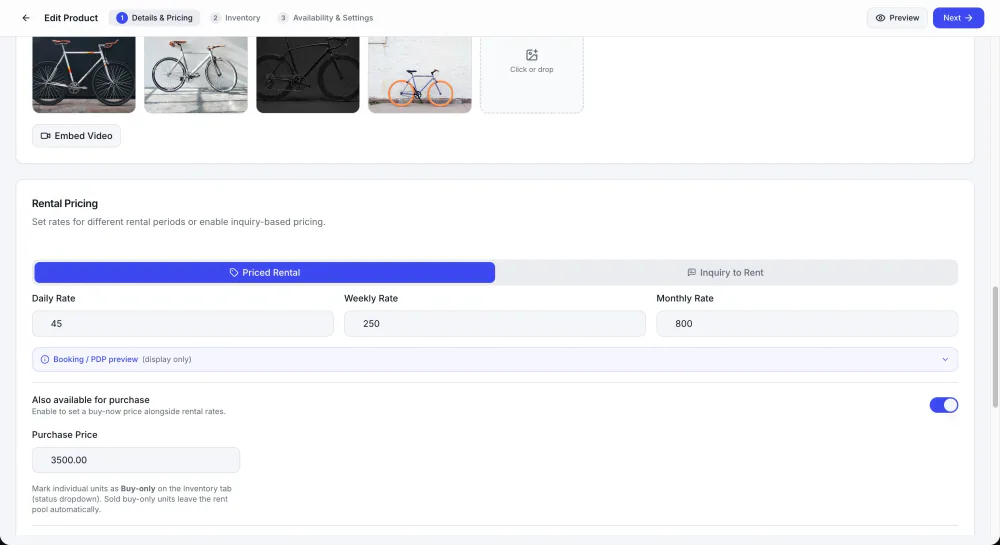
Open a product in Rental Suite and go to Details & Pricing. The Rental Pricing card has three fields: Daily Rate, Weekly Rate and Monthly Rate. A priced rental needs the daily rate. Leave the weekly or monthly field empty if you don't offer a lower price for longer rentals.

Booking / PDP preview under the fields shows how the tiers will apply before you save. On the same card, Also available for purchase adds a Buy price, and Inquiry to Rent swaps the prices for a quote form on items you'd rather price by hand (Standard plan and up).
Rental Suite
Rental Pricing card in the product editor with a $45 daily, $250 weekly and $800 monthly rate and the purchase option switched on

How weekly and monthly rental rates apply

Rental Suite counts every calendar day in the range, the first and the last included, and prices each day at a rate that depends on the length of the rental.

So 10 days of a camera at $480 a week costs ten days at $480 divided by 7, which is $685.71, not one week plus three days at the daily rate. When a longer rate applies, the product page says so and shows what the shopper saves against the daily rate.

  • 1 to 6 days: the daily rate for each day
  • 7 to 29 days: the weekly rate divided by 7, for each day
  • 30 days or more: the monthly rate divided by 30, for each day
  • No weekly or monthly rate set: the daily rate at any length

Daily rental rates and the live total on the product page

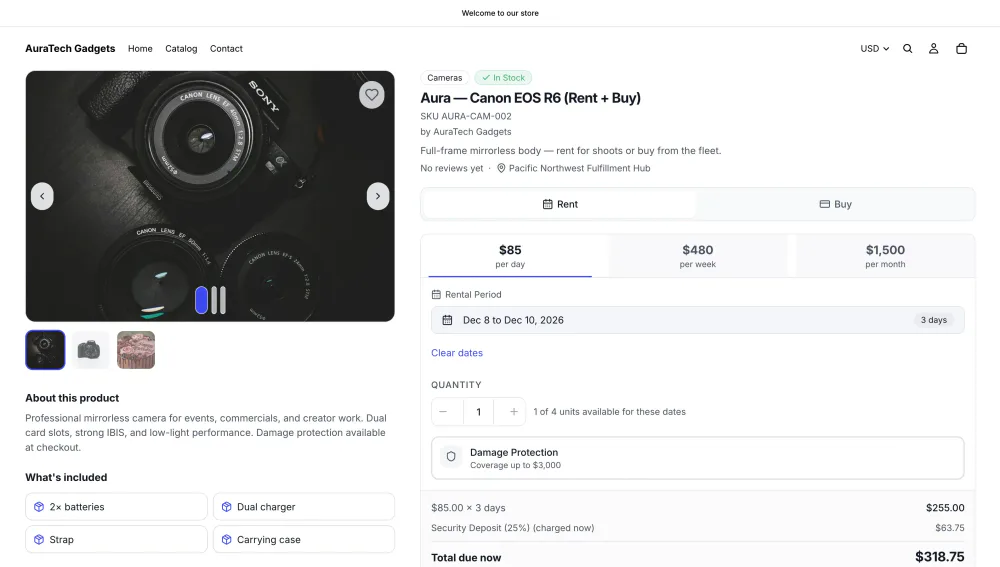
Once a shopper picks dates, the Rent tab shows the price as a sum they can check: the rate times the days and the quantity, then damage protection if they tick it, then any security deposit, with Total due now underneath. The Rent Now button carries the same amount.

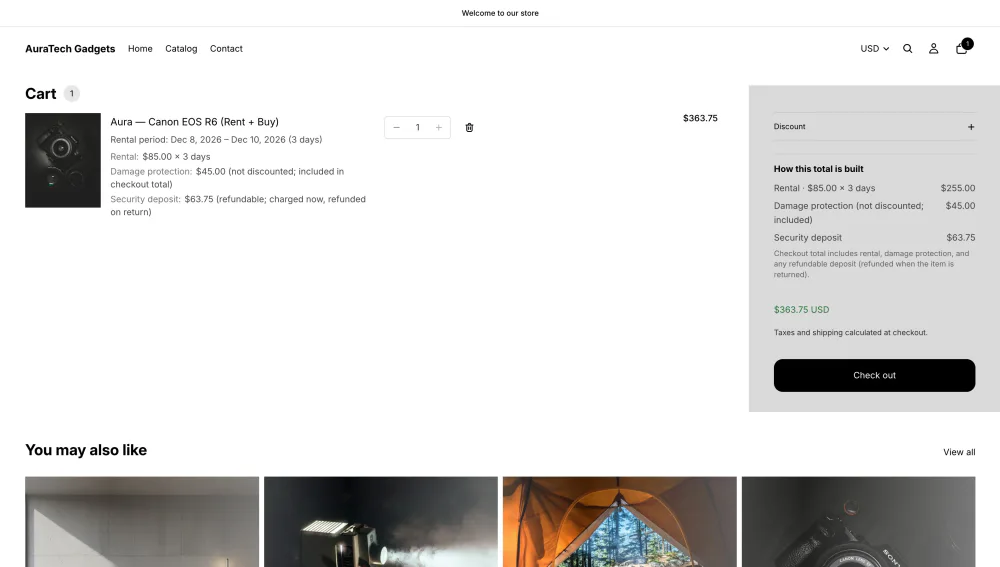
Change the dates or the quantity and the lines update at once. The cart repeats them under How this total is built, so the shopper sees the same breakdown twice before checkout.

Rental Suite
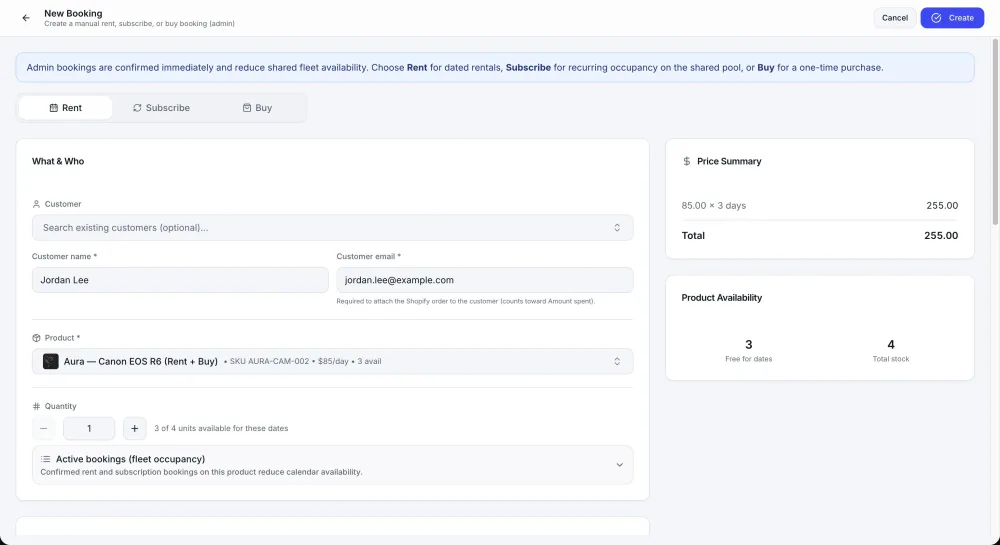
Camera product page after picking December 8 to 10: $85 times 3 days, a 25% security deposit line and the total due now

Rental rates in the admin match the website

New Booking in the admin prices a rental the same way as the product page. Pick a product and dates, and the Price Summary shows the rate times days and units, damage protection if you tick it, the deposit and the total.

So a customer who calls for a quote hears the price they'd see online, and nobody on your team works it out by hand. Editing a booking's dates later reprices it with the same rules.

Rental Suite
New Booking form in the admin with a customer, a camera at $85 a day, 3 of 4 units free for the dates and the live price summary

What sits outside the rental rate

The rate covers the rental itself. Other charges keep their own lines, so the shopper can tell them apart. Set them up on the security deposits and damage protection pages.

  • Security deposit: charged with the rental and refunded when the item comes back
  • Damage protection: an optional fee per day, or a share of the rental
  • Promo codes: money off the rental only, not the deposit or the protection fee
Rental Suite
Cart for a camera rental showing the rental, damage protection and refundable deposit lines and how the total is built

03How it works

Set up rental pricing in 4 steps

The steps a merchant takes in the Rental Suite admin, in order.

Read the setup guide

  1. Set the daily rate

    Open the product, go to Details & Pricing and enter a Daily Rate in the Rental Pricing card.

  2. Add weekly and monthly rates

    Enter them if you charge less per day for longer rentals, then open Booking / PDP preview to check how they apply.

  3. Show the rates on the product page

    Add the Rental product page block to your product template in the theme editor, so the rates appear on the Rent tab.

  4. Test a long range

    Pick 7 days on the product page and check that the weekly rate is applied and the total is what you expect.

05Get started

Try rental pricing on your store

Install Rental Suite, then turn on rental pricing in the admin. The setup guide walks through each screen.

06FAQ

Rental pricing questions

Answers to common questions about rental pricing in Rental Suite.

Still have questions?

Ask the team that builds the app. We reply within one business day.

How do you price a rental by the day, week and month?

Set a daily rate, then a weekly and a monthly rate if you charge less for longer rentals. Rental Suite uses the daily rate for 1 to 6 days, the weekly rate from 7 days and the monthly rate from 30 days, each worked out per day.

Is a rental from Friday to Sunday two days or three?

Three. Rental Suite counts every calendar day in the range, the first and the last included, and prices each one.

Are rentals between 7 and 30 days charged in whole weeks?

No. From 7 days the weekly rate is split into a daily price, the weekly rate divided by 7, and charged for each day. Ten days costs ten of those days, not two full weeks.

Can I rent out an item without showing a price?

Yes. Switch the product to Inquiry to Rent and shoppers send a quote request instead of checking out. Quote requests are on the Standard plan and up.

Do promo codes discount the deposit or damage protection?

No. A promo code takes money off the rental charge only, not the security deposit or the damage protection fee.