Customers and analytics

Rental customer profiles that work as a simple rental CRM

Bookings sit in one list, quote requests in another and orders somewhere else, so nobody can say what a regular rented this year. Rental Suite gives every renter one profile with bookings, quotes, linked orders, spend and tags.

Customer profile with total rentals, total spent, rental analytics, tags and email status, contact details and rental history

01See it in action

See customer profiles in the admin

A short walkthrough in the Rental Suite admin, with voiceover. It plays muted; press Play with sound to hear it from the start.

Read the setup guide

02Overview

Customer profiles in Rental Suite

A rental CRM keeps each renter's history in one record, so you know who's on the phone and what they've rented before you answer. Rental Suite does this with customer profiles: one per shopper, built from storefront checkouts, quote requests, bookings you enter in New Booking and the customers already in your Shopify store.

Each profile shows the renter's totals, rental analytics, rental history, quote requests, linked orders, tags and contact details. The same records power the customer filters on Bookings and Reviews, so one renter's bookings or reviews are a click away.

It's a customer database for a rental shop, not a sales pipeline. There are no deal stages, tasks or email campaigns, and nothing to import: the profiles fill in as you take bookings.

A rental CRM with one profile per shopper

Every booking, purchase, subscription and quote request is linked to a customer record. Rental Suite matches people by email, so a renter who books online and later calls in a phone booking ends up on the same profile. A shopper with no email is kept as a guest, matched by name and phone.

Customers from your Shopify store are synced in too, so the Customers list also shows people who haven't rented yet. On any profile, Re-sync with Shopify matches the record by Shopify id or email, updates the name and marketing consent, and attaches their orders.

  • Storefront checkouts and quote forms
  • Bookings you enter in New Booking
  • Customers already in your Shopify store
Rental Suite
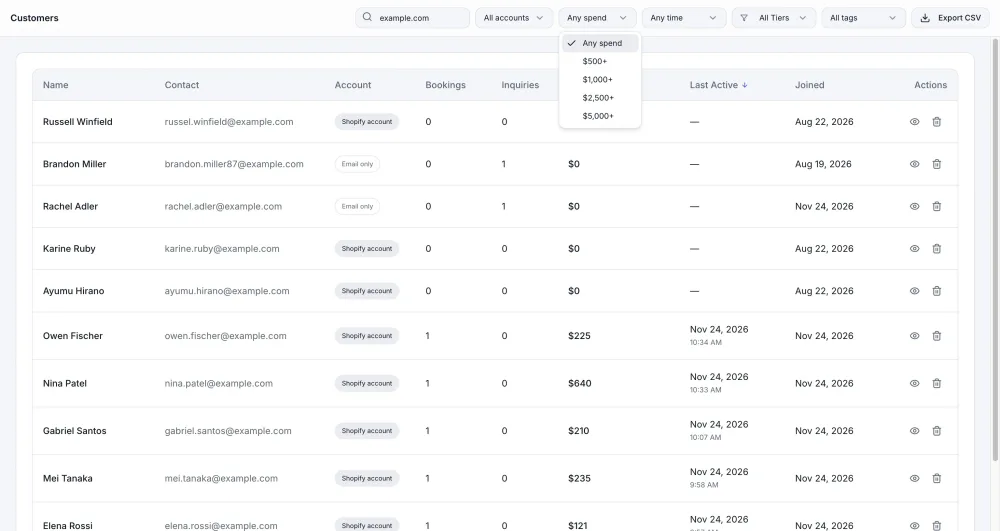
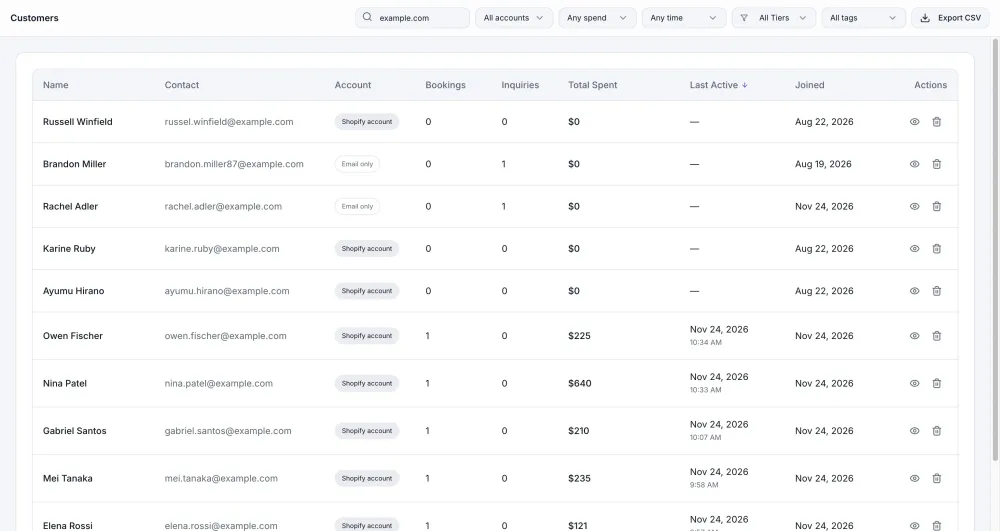
Customers list with name, contact, account type, bookings, inquiries, total spent, last active and joined date for each renter

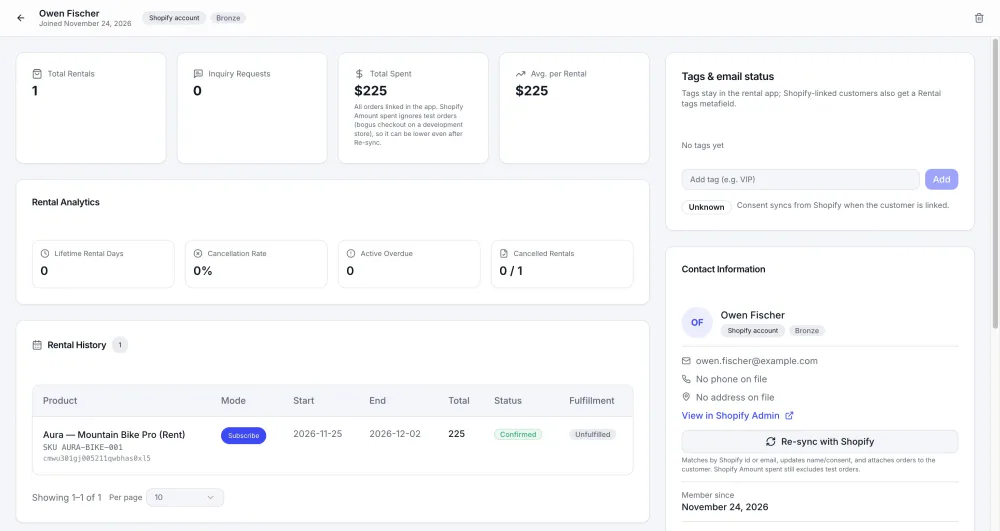
Spend and rental analytics at the top of the profile

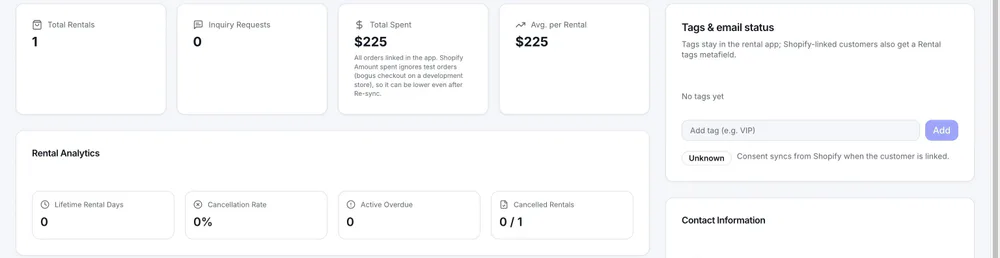
Four totals open the profile: Total Rentals, Inquiry Requests, Total Spent and Avg. per Rental. Total spent counts every order linked in the app, so it can be higher than the Amount spent figure in your Shopify admin, which leaves out test orders.

Under them, Rental Analytics shows how this person rents: lifetime rental days, cancellation rate, active overdue rentals and cancelled rentals out of the total. For renters with a history, a Favorite Products table lists the five products they rent most, with the number of rentals and the revenue for each, and any overdue rentals are listed with their due dates.

Rental Suite
Top of a customer profile with total rentals, inquiry requests, total spent, average per rental, rental analytics, tags and email status

Rental history with every booking

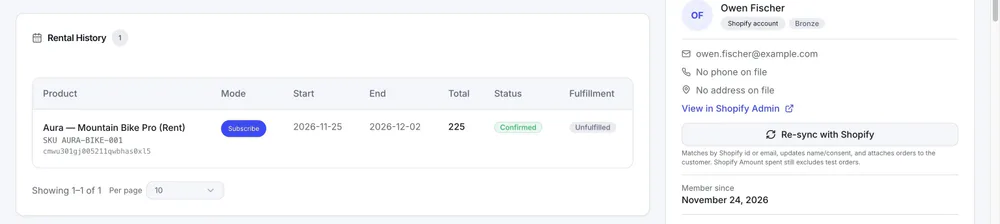
The Rental History table lists each booking with its product, mode (rent, buy or subscribe), start and end dates, total, status and fulfillment. Click a row to open the booking itself.

Beside it, Contact Information holds the email, phone and address on file, a link to the customer in your Shopify admin, and the dates they became a customer, were last active and last rented.

Rental Suite
Rental history table with product, mode, start and end dates, total, status and fulfillment, beside the renter's contact details

Quote requests and orders on the same record

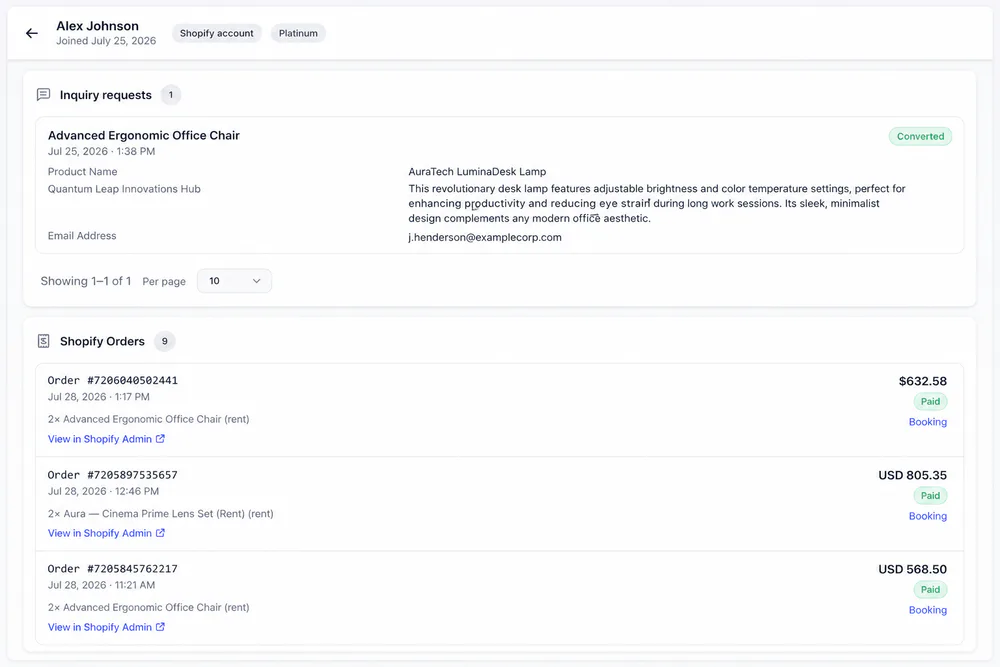
Renters who ask for a quote before booking keep that request on their profile. Inquiry requests shows each one with the product, the date, its status and the answers from your quote form, and opens the request when you click it.

Shopify Orders lists the orders linked to this customer with the order number, date, total, payment status and line items. Each rental line links to its booking, and each order links to the order in your Shopify admin, so you can move from a question about a charge to the booking behind it.

Rental Suite
Customer profile with a quote request and its form answers, plus three linked orders with totals, payment status and booking links

Rental customer management with tags, tiers and filters

Add your own tags to a profile, such as VIP, trade account or film school, up to 20 per customer. For customers linked to a Shopify account, Rental Suite also copies the tags to a Rental tags metafield on the Shopify customer. The profile shows their email marketing status as synced from Shopify, including when an address is marked invalid.

Each customer also gets a tier from their total spend: Bronze, Silver from $1,000, Gold from $2,500 and Platinum from $5,000. On the Customers list, search by name or email and filter by account type, minimum spend, last activity, tier or tag. Export CSV downloads the rows on the current page of the list, with contact details, tier, tags, consent, bookings, inquiries and spend.

Rental Suite
Customers list with the spend filter open at $500, $1,000, $2,500 and $5,000, beside the account, activity, tier and tag filters

03How it works

Set up customer profiles in 4 steps

The steps a merchant takes in the Rental Suite admin, in order.

Read the setup guide

  1. Take bookings as usual

    Storefront checkouts, quote requests and New Booking create or update a profile on their own. There's nothing to import.

  2. Open Customers

    Search by name or email, or filter by account, spend, last activity, tier or tag.

  3. Open a profile

    Check the renter's totals, rental history, quote requests and linked orders before you reply.

  4. Tag your regulars

    Add tags like VIP so you can filter for them later. Shopify-linked customers get the same tags in a metafield.

05Get started

Try customer profiles on your store

Install Rental Suite, then turn on customer profiles in the admin. The setup guide walks through each screen.

06FAQ

Customer profiles questions

Answers to common questions about customer profiles in Rental Suite.

Still have questions?

Ask the team that builds the app. We reply within one business day.

What is a rental CRM?

A rental CRM is a customer database built around rentals: each renter's bookings, dates, spend and notes in one record. Rental Suite covers that with customer profiles. It doesn't have sales pipelines, tasks or email campaigns.

Where do rental customer profiles come from?

They're created from storefront checkouts, quote requests, New Booking and your Shopify customer list. Rental Suite matches people by email, and guests without an email by name and phone.

Can I see a customer's quote requests and orders?

Yes. A profile lists their quote requests with status and form answers, and the orders linked to them, each with a link to its booking and to the order in your Shopify admin.

Why is total spent different from Amount spent in my Shopify admin?

Total spent counts every order linked in Rental Suite. Shopify's Amount spent leaves out test orders, so on a development store it can be lower, even after a re-sync.

Can I export my rental customer database?

Yes. Export CSV on the Customers list downloads the rows on the current page, with any filters applied: name, contact details, account type, tier, tags, marketing consent, bookings, inquiries, total spent, last active and joined date.

Do customer tags sync to Shopify?

For customers linked to a Shopify account, yes: tags are copied to a Rental tags metafield on the Shopify customer. Guest customers keep their tags in Rental Suite only.