Email and notifications

A booking reminder email before each rental is due back

Chasing returns by phone eats your morning, and the next renter is waiting for the same unit. Rental Suite sends a booking reminder email before the return date and an overdue notice if the gear still isn't back.

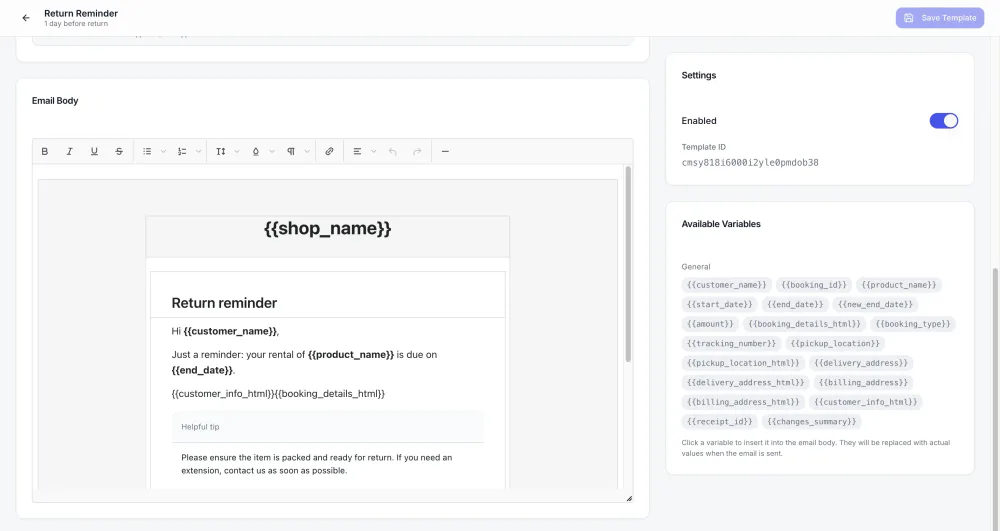
Return Reminder email body in the editor: Return reminder heading, the product and the date it's due, the booking details blocks and a tip about packing the item and asking early for an extension

01See it in action

See return reminder emails in the admin

A short walkthrough in the Rental Suite admin, with voiceover. It plays muted; press Play with sound to hear it from the start.

Read the setup guide

02Overview

Return reminder emails in Rental Suite

A booking reminder email tells the customer when their rental is due back, before the day arrives. Rental Suite sends one for every confirmed rental, as many days ahead as you choose, and it's on from the day you install.

If the date passes and the item is still out, the rental turns Overdue and the customer gets an Overdue Notice. You set both timings in Settings › Lifecycle, edit both emails under Email Templates, and your team sees each one as an alert in the Notifications feed. Nothing goes to customers whose rentals are already back.

Pick when the rental return reminder goes out

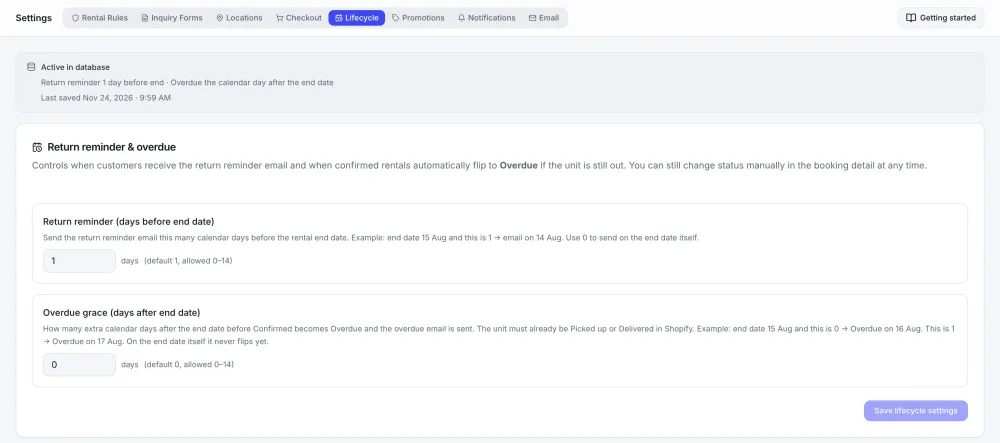
In Settings › Lifecycle, Return reminder (days before end date) sets how many calendar days ahead the email is sent. The default is 1, so a rental ending on 15 August gets its reminder on 14 August. Choose anything from 0 to 14 days; 0 sends it on the end date itself.

The reminder goes to confirmed rentals with a customer email, once per booking. If a send fails, for example because your mail server is down, Rental Suite keeps trying on its next checks until it goes through or a week after the end date has passed.
Rental Suite
Settings, Lifecycle tab, with the return reminder set to 1 day before the end date and an overdue grace period of 0 days, each allowed from 0 to 14

What the rental reminder email says

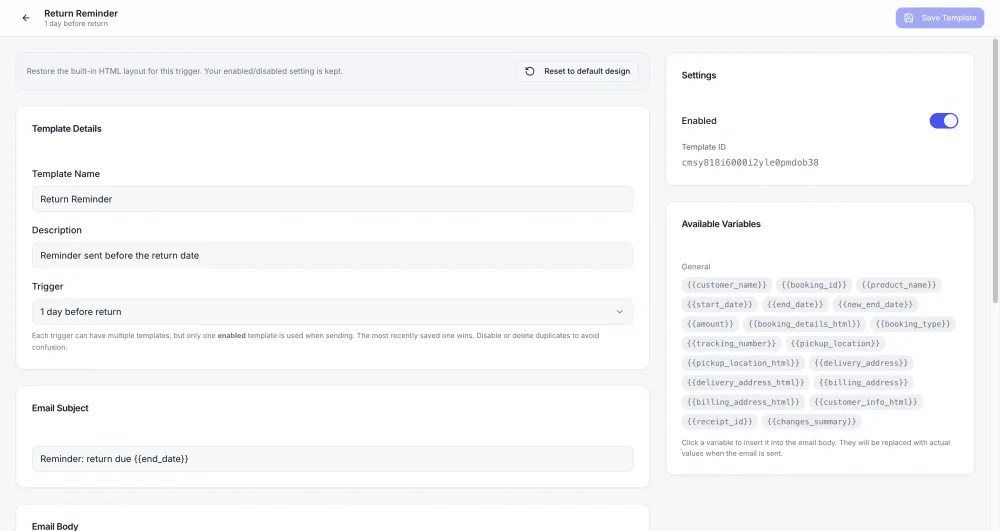
The built-in Return Reminder uses the subject "Reminder: return due {{end_date}}" with the real date filled in. The body names the product and the date it's due, shows the pickup or delivery details and the booking summary, and ends with a short tip: pack the item ready for return, and get in touch early if you need an extension.

Edit it like any other template. Add your opening hours, the drop-off address or how to book a courier, so the customer has what they need in the one email. In the template list its trigger reads "1 day before return", but the day it sends follows your Lifecycle setting.

Rental Suite
Return Reminder template with the trigger 1 day before return, the subject Reminder: return due {{end_date}}, the Enabled switch and the variables list

An overdue rental notice after the grace days

Overdue grace (days after end date) decides when a late rental turns Overdue. With the default of 0, a rental ending on 15 August turns Overdue on 16 August; with 1, on 17 August. It doesn't flip on the end date itself.

A rental only turns Overdue if the unit really went out: the handoff must be marked Picked up or Delivered on the Shopify order. When it flips, the customer gets the Overdue Notice once, and the unit stays blocked on your calendar until it's back. You can still change the status by hand on the booking at any time.

Word the overdue email your way

The default Overdue Notice is short and polite: it says the product was due on the end date and hasn't come back, asks the customer to return it as soon as possible, and tells them to ignore the message if they already have.

Rewrite it to fit how you work, such as who to call to arrange a late return. Rental Suite sends the notice and marks the booking Overdue; what happens next is between you and the customer.

Rental Suite
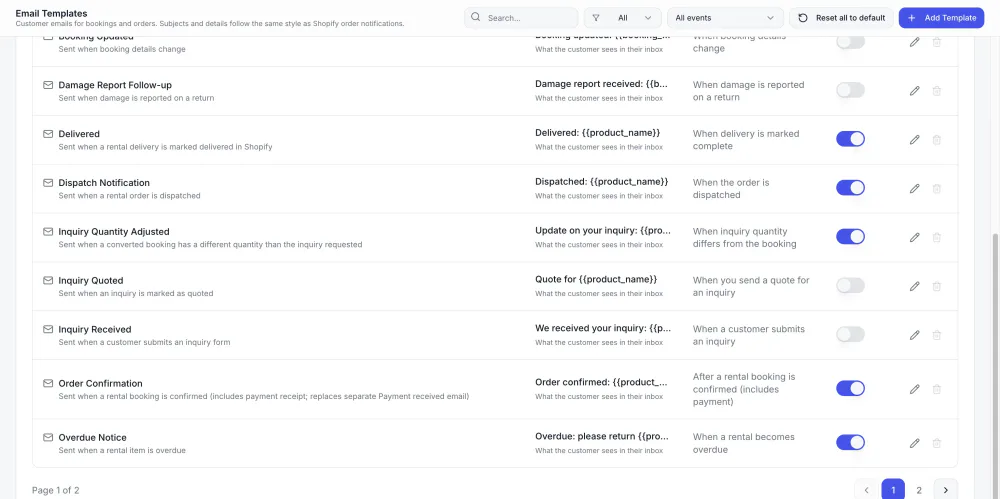
Email Templates list where Overdue Notice, with the subject Overdue: please return, is switched on and sends when a rental becomes overdue

Your team gets booking reminder emails too, as alerts

When the reminder goes out, a Return due tomorrow alert lands in the Notifications feed with the customer, product and booking. The alert keeps that name whatever number of days you pick in Lifecycle. When a rental turns Overdue, an Overdue rental alert follows, and Return completed appears once it's back.

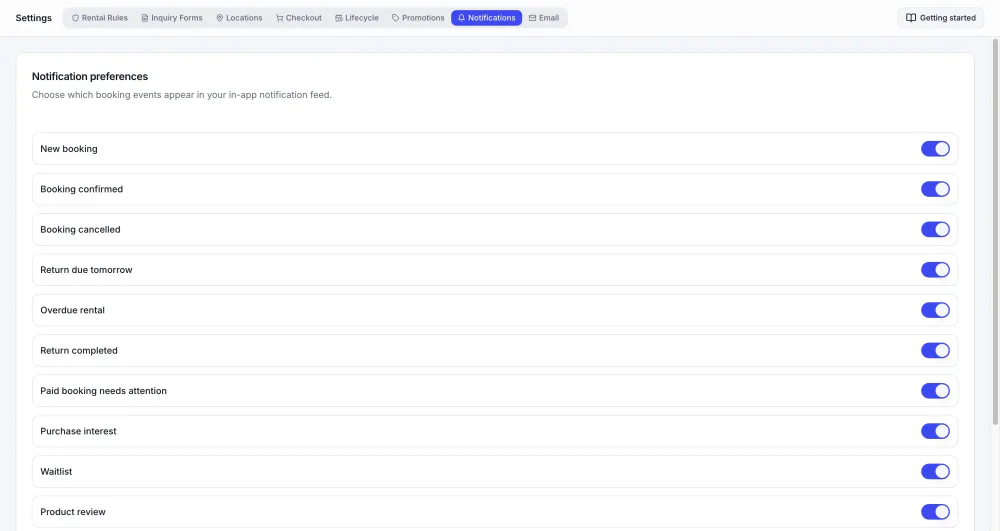
Each alert has its own switch in Settings › Notifications, so you can keep the overdue alert and drop the rest.

Rental Suite
Notification preferences where Return due tomorrow and Overdue rental each have their own switch

03How it works

Set up return reminder emails in 4 steps

The steps a merchant takes in the Rental Suite admin, in order.

Read the setup guide

  1. Set the reminder days

    In Settings › Lifecycle, enter how many days before the end date the reminder sends, from 0 to 14.

  2. Set the overdue grace days

    Enter how many days after the end date a rental that's still out turns Overdue, then save the lifecycle settings.

  3. Edit both emails

    In Email Templates, open Return Reminder and Overdue Notice, adjust the wording and keep both enabled.

  4. Mark handoffs on the order

    Mark pickups and deliveries on the Shopify order, so Rental Suite knows which rentals are really out.

05Get started

Try return reminder emails on your store

Install Rental Suite, then turn on return reminder emails in the admin. The setup guide walks through each screen.

06FAQ

Return reminder emails questions

Answers to common questions about return reminder emails in Rental Suite.

Still have questions?

Ask the team that builds the app. We reply within one business day.

What is a booking reminder email?

It's an automatic email that reminds a customer about an upcoming date on their booking. In Rental Suite it's the return reminder, sent a set number of days before the rental's end date.

How many days before the return date is the reminder sent?

One day by default. You can pick anything from 0 to 14 days in Settings › Lifecycle, and 0 sends it on the end date itself.

When does a rental become overdue?

After the end date plus your grace days, and only if the unit was marked Picked up or Delivered on the Shopify order. With 0 grace days, a rental ending on 15 August turns Overdue on 16 August.

Is the overdue notice sent more than once?

No. Each overdue rental gets the Overdue Notice once. If you want to follow up again, contact the customer from the booking.

Can I turn the return reminder off?

Yes. Switch Return Reminder off in Email Templates and no reminder emails send. The Return due tomorrow alert for your team has its own switch in Settings › Notifications.

Do subscriptions and purchases get return reminders?

No. Return reminders and overdue notices are for rentals with an end date. Subscriptions run until they're cancelled, and purchases aren't returned.