Products and inventory

Equipment tracking software with a serial number on every unit

When three identical cameras go out, you need to know which one came back with a scratch. Rental Suite gives each unit its own row and serial number, and shows from your bookings whether it's free, reserved or out on rent.

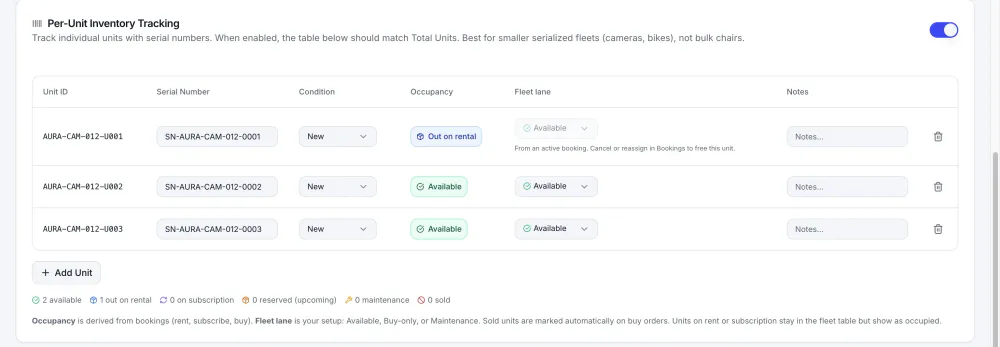
Per-unit inventory table for a camera body with three serial numbers: one out on rental and two available, each with its condition and fleet lane

01See it in action

See serial number tracking in the admin

A short walkthrough in the Rental Suite admin, with voiceover. It plays muted; press Play with sound to hear it from the start.

Read the setup guide

02Overview

Serial number tracking in Rental Suite

Equipment tracking software for rentals answers two questions: which physical unit is this, and where is it in the booking cycle? In Rental Suite you turn on per-unit tracking for a product, and each unit gets a row with a unit ID, a serial number, a condition and notes.

Your bookings fill in the rest. A unit assigned to a booking shows as reserved before the dates start and out on rental while they run, so the table matches your calendar instead of what someone remembered to update.

It suits smaller serialized fleets such as cameras, lenses, bikes and power tools. For identical bulk items like chairs, a plain unit count is simpler.

Serial number tracking for each unit

Open a product, go to the Inventory step and switch on Per-Unit Inventory Tracking. Rental Suite creates one row per unit to match Total Units, with a unit ID built from the product's SKU and a starting serial number you can replace with the one printed on the item.

Add more with Add Unit. If the rows and Total Units ever disagree, the product shows the difference and a button that syncs the active fleet to the right count.

  • Unit ID from the SKU, such as AURA-CAM-012-U001
  • Serial number, editable for each unit
  • Condition: New, Like New, Good or Fair
  • Notes for scratches, missing parts or service dates
Rental asset tracking that follows your bookings

You don't set the Occupancy column. Rental Suite reads it from bookings: a unit assigned to an upcoming rental shows as Reserved for rental, then Out on rental once the dates start. Subscriptions work the same way, with Reserved for subscription and On subscription.

Under the table, one line counts the units available, out on rental, on subscription, reserved, in maintenance and sold, so you can read the state of the whole product at a glance.

Auto-assign a unit or pick one yourself

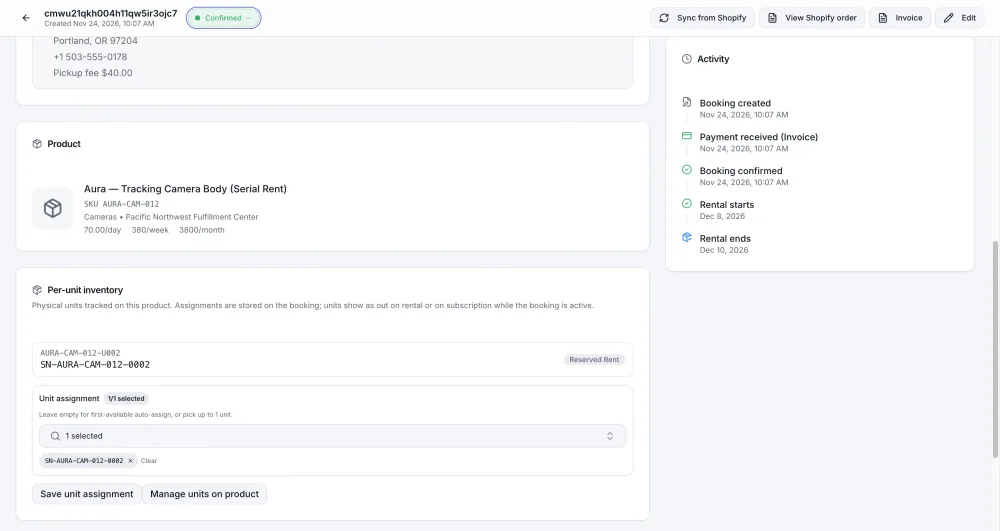
When an online order is paid, Rental Suite assigns the first unit that's free for those dates. In New Booking and on the booking page, leave Unit assignment empty for the same automatic pick, or search by serial or unit ID and choose the exact unit you're handing over.

A unit already booked for overlapping dates can't be picked again, and you can change the assignment while the booking is active.

Rental Suite
Booking page for a camera rental with the assigned unit and its serial number, the unit assignment picker and the booking activity

The serial number on every booking

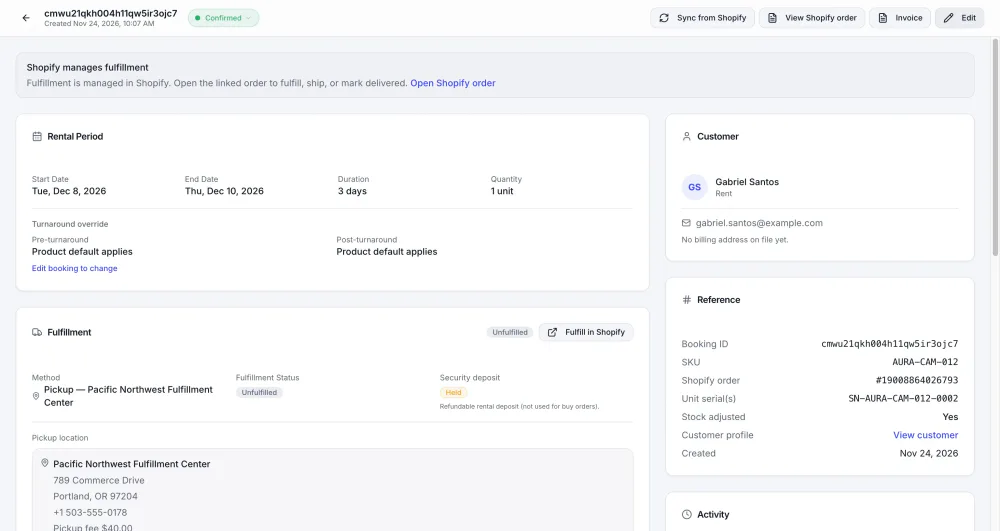
Each booking lists the serials it holds under Reference, next to the SKU and the Shopify order number. When a customer calls about a fault, you can see which unit they had without digging through notes.

On the product, a unit on an active booking is locked: its fleet lane can't change until you cancel the booking or reassign the unit in Bookings.

Rental Suite
Booking detail for a three day camera rental with the pickup location, the security deposit held and the unit serial number under Reference

Buy-only and maintenance lanes

The Fleet lane is your own setting for each unit, separate from occupancy, and it decides which kinds of booking the unit can join. Sold units leave the rental pool on their own and stay in the table for your records, so a camera you sold months ago still shows its serial and notes.

  • Available: the unit can be rented, subscribed or sold
  • Buy-only: the unit is for sale and never rented
  • Maintenance: the unit stays out of rentals and sales until you switch it back
  • Sold: set for you when a Buy order takes the unit

03How it works

Set up serial number tracking in 4 steps

The steps a merchant takes in the Rental Suite admin, in order.

Read the setup guide

  1. Open the product

    In Products, open the item and go to the Inventory step.

  2. Set Total Units

    Enter how many of this item you own. That's the number of rows the table will hold.

  3. Turn on per-unit tracking

    Switch on Per-Unit Inventory Tracking. Rental Suite adds a row for each unit.

  4. Add serials and lanes

    Type each serial number, set the condition, and mark any unit Buy-only or Maintenance. Then save the product.

05Get started

Try serial number tracking on your store

Install Rental Suite, then turn on serial number tracking in the admin. The setup guide walks through each screen.

06FAQ

Serial number tracking questions

Answers to common questions about serial number tracking in Rental Suite.

Still have questions?

Ask the team that builds the app. We reply within one business day.

What is equipment tracking software for rentals?

It's software that records each physical item you rent out and its status: free, booked, out or in repair. In Rental Suite each unit has a serial number and a status that comes from your bookings.

Can I track rental equipment by serial number?

Yes. Turn on per-unit tracking for a product and every unit gets a row with a unit ID and a serial number you can edit. Bookings then hold specific serials.

How do I know which unit a customer has?

Open the booking: the assigned serial is listed under Reference and in its per-unit inventory card. On the product, that unit shows as reserved or out on rental.

Do I have to assign units by hand?

No. Leave the unit assignment empty and Rental Suite assigns the first free unit for the dates. Pick one yourself only when a specific unit should go out.

Should I use serial tracking for every product?

No. It's meant for smaller fleets of items you tell apart, like cameras and bikes. For identical bulk items such as chairs or tables, a Total Units count is enough.

Can a rental unit also be sold?

Yes. Available units can be sold from the same fleet, and units you mark Buy-only are kept for sale only. A unit sold through a Buy order is marked Sold and stops being rented.