Customers and analytics

Equipment utilization: see what's out, what earns and what sits idle

A product that's always booked and one that hasn't left the shelf in months look the same in a stock count. Rental Suite shows how many units of each product are out on rent today, next to what each product has earned.

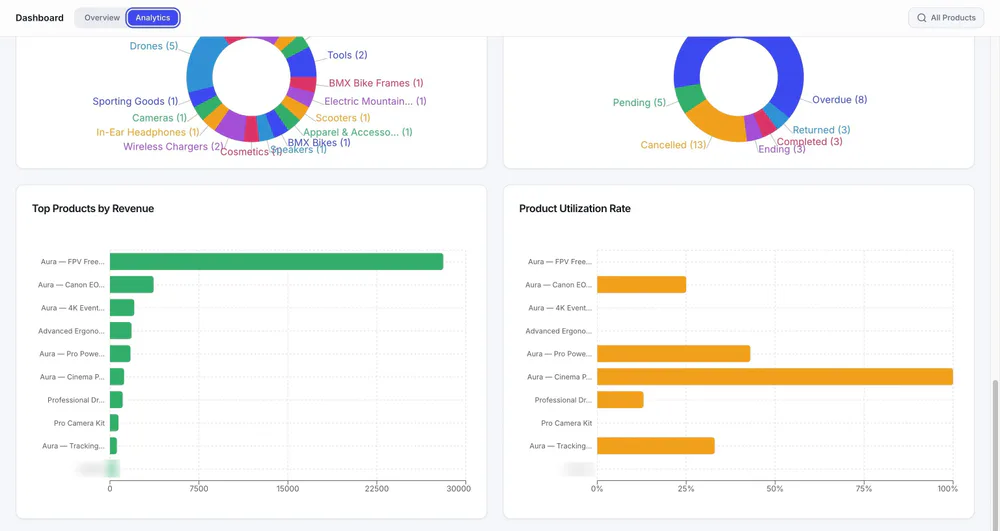
Dashboard Analytics tab with top rental products by revenue beside each product's utilization rate, the share of its units out on rent

01See it in action

See equipment utilization in the admin

A short walkthrough in the Rental Suite admin, with voiceover. It plays muted; press Play with sound to hear it from the start.

Read the setup guide

02Overview

Equipment utilization in Rental Suite

Equipment utilization is the share of a product's units that are out on rent. Rental Suite works it out from your bookings: the units on rentals that cover today, plus overdue units that aren't back yet, divided by the Total Units you own.

You see it in two places. The Products & Inventory list shows a utilization bar for every product, and the dashboard's Analytics tab charts it for your top rental products by revenue, right beside what each one has earned. A product near the top of the revenue chart with a short utilization bar earns well per booking but waits on the shelf in between.

It's a snapshot of today, not an average over a month. Check it on a busy Saturday and a quiet Tuesday and you'll see different bars, because it tells you what's out right now.

How the equipment utilization rate is worked out

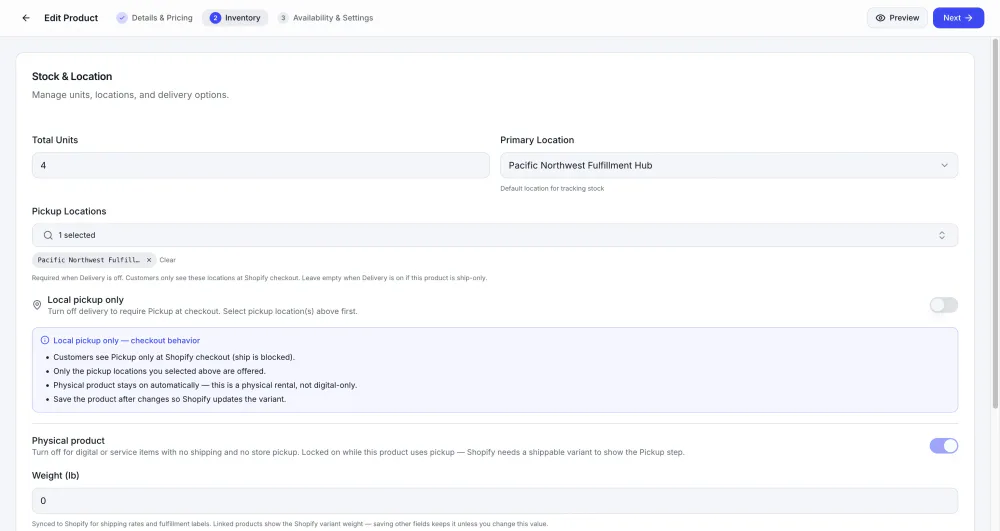
The rate divides units out on rent by the Total Units you set on the product's Inventory step. If you own four projectors and three are out today, the bar sits at three quarters.

Rental Suite reads the units out from your bookings, so there's nothing to tick off by hand. Change Total Units when you buy or retire gear and the rate follows.

  • Counts confirmed rentals whose dates include today
  • Counts overdue rentals until the unit is back
  • Leaves out bookings that start later, quote requests and subscriptions
Rental Suite
Product editor Inventory step with the total units field, primary location and pickup locations for a rental product

Fleet utilization rate for every product

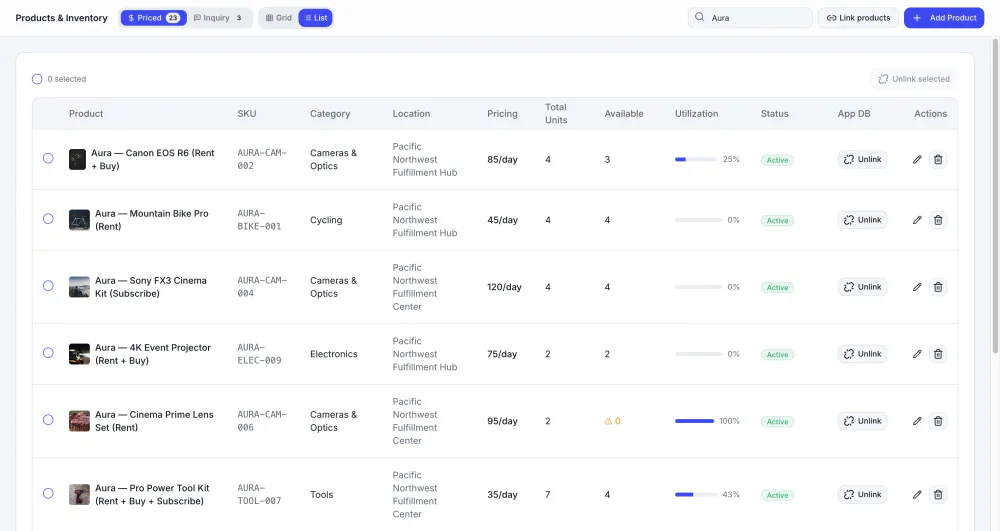
The Products & Inventory list shows each product's total units, units available today and a utilization bar with its percentage. Sort the list by Utilization to bring the busiest products to the top, or reverse it to find the ones that sit idle.

This is the full view: every rental product is listed, whether it has earned a lot or nothing yet. For how stock is shared between renting, buying and subscribing, see rental fleet management.

Rental Suite
Products and Inventory list with daily rates, total units, units available and a utilization bar for each rental product

Overdue units keep counting

Utilization follows the unit, not the calendar. Once a rental passes its end date, plus any grace days you set, while the item is still with the customer, Rental Suite marks it Overdue. It keeps counting toward utilization until the return is recorded on the order, so a late return can't make a product look free.

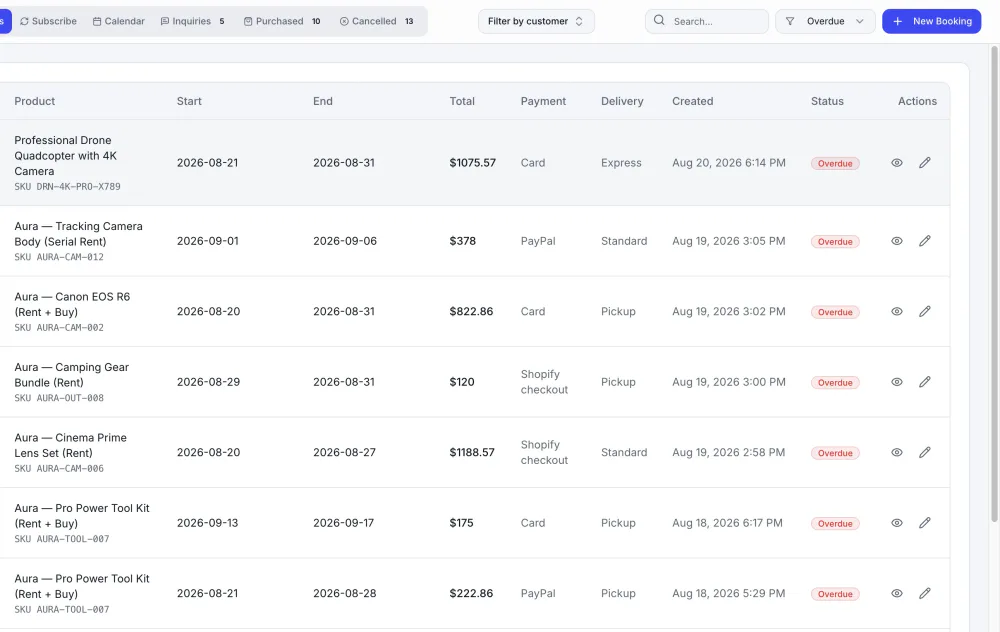
On Bookings, filter the Rentals list to Overdue to see those rentals with their product, dates and total, and chase the ones holding units.

Rental Suite
Bookings list filtered to overdue rentals with product, dates, total and the Overdue status badge

Rental utilization on the dashboard

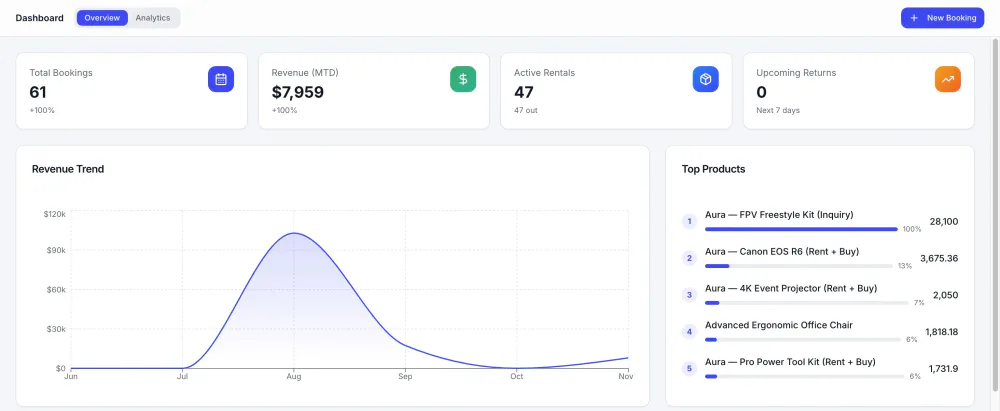
On Dashboard, the Overview tab shows Active Rentals, your confirmed and overdue bookings, and Upcoming Returns due in the next 7 days. Top Products ranks the five rental products that have brought in the most revenue.

Switch to Analytics for the Product Utilization Rate chart beside Top Products by Revenue, covering your top ten rental products by revenue. The product filter narrows the charts by product, category or tag, which helps when you only stock a few lines in each category.

Rental Suite
Dashboard Overview with total bookings, revenue this month, active rentals, upcoming returns, a revenue trend and top products

Equipment utilization tracking you can act on

Utilization doesn't decide anything for you, but it points at the questions worth asking. Rental Suite has a setting for each answer; the Buy-only and Maintenance lanes need per-unit tracking turned on for the product.

  • Always out: add units by raising Total Units
  • Rarely out: try a weekly rate or a promo code
  • Idle units you'd rather sell: mark them Buy-only in the unit table
  • A unit needs a repair: move it to the Maintenance lane

03How it works

Set up equipment utilization in 4 steps

The steps a merchant takes in the Rental Suite admin, in order.

Read the setup guide

  1. Set Total Units

    On each product's Inventory step, enter how many units you own. That's the base of the rate.

  2. Take bookings

    Storefront checkouts and New Booking hold units for their dates. Rentals that cover today count as out.

  3. Sort the products list

    Open Products & Inventory and sort by Utilization to see the busiest and the idle products.

  4. Compare with revenue

    Open Dashboard, then Analytics, to see utilization beside revenue for your top products. Filter by product, category or tag.

05Get started

Try equipment utilization on your store

Install Rental Suite, then turn on equipment utilization in the admin. The setup guide walks through each screen.

06FAQ

Equipment utilization questions

Answers to common questions about equipment utilization in Rental Suite.

Still have questions?

Ask the team that builds the app. We reply within one business day.

What is equipment utilization rate?

It's the share of your units that are out on rent: units out divided by units owned. Rental Suite shows it for each product for today, worked out from your bookings.

How do I calculate rental utilization?

Divide the units out on rent by the total units you own. Over a period, people divide rented unit days by available unit days; Rental Suite shows today's figure and doesn't chart utilization over time.

Does utilization include subscriptions or sales?

No. The rate counts rental bookings only. Units on a subscription aren't included, and units you sell leave the fleet, which lowers Total Units.

Why does a booked product show no utilization?

Bookings that start later don't count yet. The rate covers rentals whose dates include today, plus overdue rentals that haven't come back.

Which products appear on the dashboard utilization chart?

Your top ten rental products by revenue. To see utilization for every product, use the Products & Inventory list and sort by Utilization.

Does Rental Suite track equipment hours or meters?

No. It counts units that are out on bookings. It doesn't read engine hours, meters or usage data from the equipment itself.