Subscribe rentals

Recurring rental software that bills each cycle for you

Chasing a payment every week or month is the dull part of a rental subscription. Rental Suite charges each renewal through Shopify on its due date and flags the subscription overdue if a charge fails.

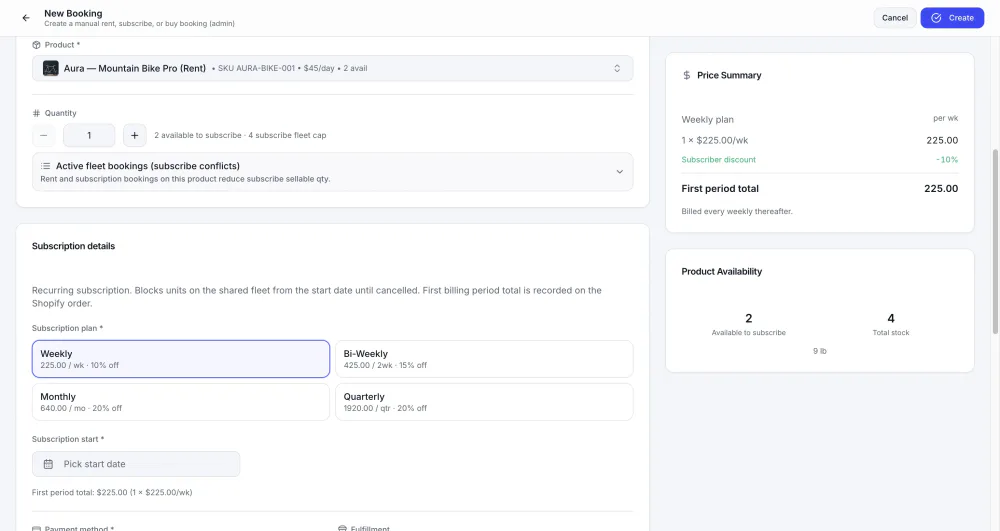
New Booking in Subscribe mode with weekly, bi-weekly, monthly and quarterly plan cards, the 10% subscriber discount and a $225.00 first period total

01See it in action

See recurring billing in the admin

A short walkthrough in the Rental Suite admin, with voiceover. It plays muted; press Play with sound to hear it from the start.

Read the setup guide

02Overview

Recurring billing in Rental Suite

Recurring rental software takes payment for each cycle of a subscription without you sending an invoice. When a shopper subscribes on your product page, they pay the first cycle at checkout and Shopify saves the plan as a subscription contract with their payment method.

From then on, Rental Suite checks every few minutes for subscriptions whose next payment date has come, asks Shopify to charge the saved payment method, and moves Next Payment forward when the charge goes through. Each cycle is charged once, even if a check runs twice.

The first cycle is paid up front

On the product page the first billing cycle starts on the day of checkout, and the shopper pays it like any other order. The cart line carries the plan, so checkout treats it as a subscription and Shopify creates the contract once the order is paid.

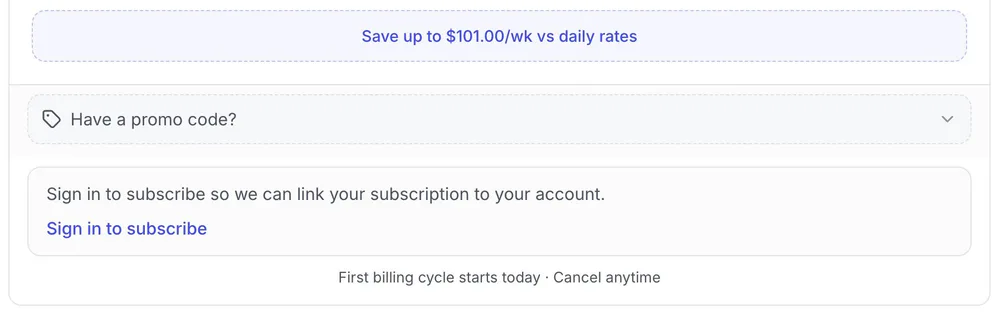
Rental Suite links that contract to the subscription booking, which is what lets it charge the cycles that follow. A promo code entered on the Subscribe tab applies to the first cycle.
Rental Suite
Subscribe tab with the saving against daily rates, a promo code field, the sign-in prompt and First billing cycle starts today

Renewals charge on the next payment date

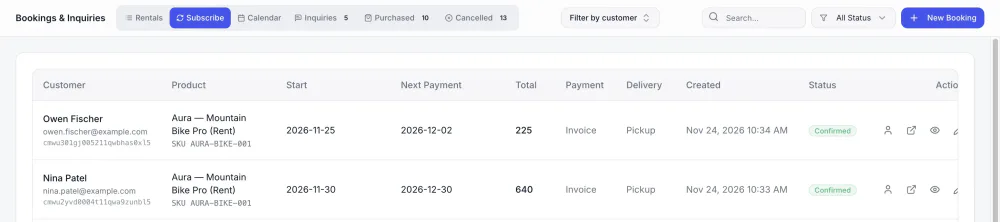
Each subscription has a Next Payment date in Bookings › Subscribe. When that date comes, Rental Suite asks Shopify to charge the customer's saved payment method for the plan price. A successful charge creates the renewal order in Shopify and moves Next Payment on by one cycle.

Before charging, it checks that the subscription is still active and that its contract in Shopify can be billed. Cancelled, ending and expired subscriptions are skipped, so a cancellation stops the next charge.

Rental Suite
Bookings Subscribe tab with two subscriptions, their start dates, next payment dates, totals, payment, delivery and Confirmed status

Rental subscription billing when a charge fails

If Shopify reports a failed charge, the subscription turns Overdue and keeps its units, and you get an in-app overdue alert. Rental Suite also has Shopify email the customer a secure link to update their payment method, once per cycle. Once a charge goes through, the subscription is Confirmed again.

If the charge request doesn't reach Shopify because of a short outage or a rate limit, Rental Suite tries again after 15 minutes, then after 1 hour, then after 6 hours.

Cancelling stops the next charge

Customers cancel from the Subscriptions page in their account or on the product page, and you can cancel from the booking. Billing stops straight away and the plan is cancelled in Shopify.

If the gear is still out, the subscription shows Ending. It isn't charged again, but it keeps its units until the item comes back and the booking is Returned. Then the units are free for Rent, Buy and Subscribe.

Recurring rental billing for subscriptions made in New Booking

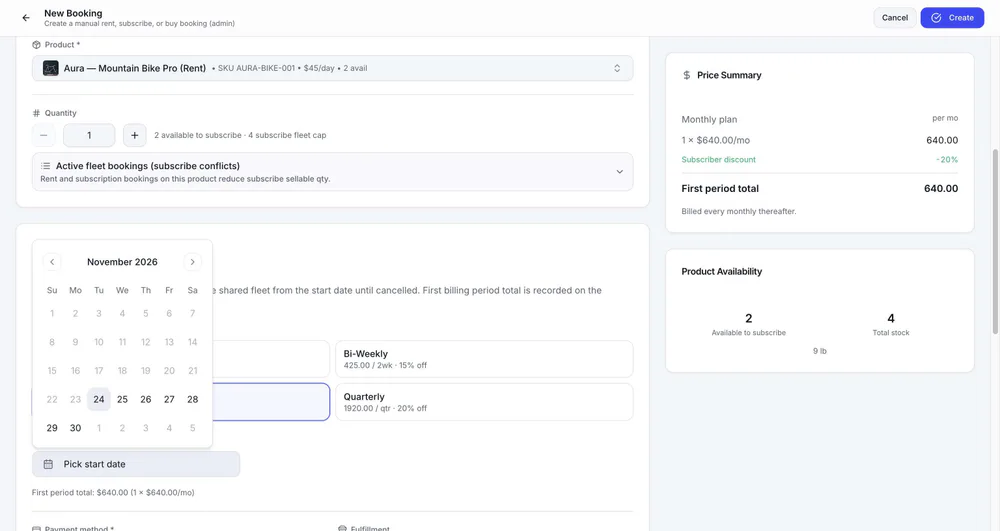
In New Booking › Subscribe you choose the start date, from today on, and Rental Suite sets the first Next Payment one cycle after it. The first period total is recorded on the Shopify order you create there.

Subscriptions made in New Booking don't get a Shopify subscription contract, so their later cycles aren't charged automatically. Collect those payments the way you took the first one, or point the customer to your product page to subscribe at checkout.

Rental Suite
New Booking in Subscribe mode with the start date calendar open, past days greyed out, and a monthly plan first period total

03How it works

Set up recurring billing in 4 steps

The steps a merchant takes in the Rental Suite admin, in order.

Read the setup guide

  1. Add plans to the product

    Switch on Recurring / Subscription Pricing and add a plan for each billing cycle.

  2. Add the Subscribe tab and account page

    Add the Rental product page block to your theme and the Rental subscriptions page to customer accounts.

  3. Let customers subscribe at checkout

    Shoppers sign in, pick a plan and pay the first cycle, and Shopify saves the contract.

  4. Watch Bookings › Subscribe

    Check next payments and statuses. Overdue subscriptions are flagged with an alert.

05Get started

Try recurring billing on your store

Install Rental Suite, then turn on recurring billing in the admin. The setup guide walks through each screen.

06FAQ

Recurring billing questions

Answers to common questions about recurring billing in Rental Suite.

Still have questions?

Ask the team that builds the app. We reply within one business day.

What is recurring rental software?

It's software that bills a rental customer on a repeating schedule instead of once per booking. Rental Suite does this for subscriptions bought on your product page, charging each cycle through Shopify on its next payment date.

How often is a subscription charged?

Once per billing cycle: every week, every two weeks, every month or every quarter, depending on the plan the customer chose. Each cycle is charged on its Next Payment date.

What happens if a renewal payment fails?

The subscription turns Overdue and keeps its units, you get an alert, and Shopify emails the customer a secure link to update their payment method. Once a charge goes through, it's Confirmed again.

Are subscriptions created in New Booking billed automatically?

No. Only subscriptions bought through checkout have a Shopify subscription contract to charge. For ones made in New Booking, the first period goes on the Shopify order and later cycles are yours to collect.

Can a customer stop the next charge?

Yes. Cancelling from the Subscriptions page in their account, or on the product page, stops billing straight away. The item still has to come back before the subscription closes.