Subscribe rentals

Subscription rental plans with a discount or a fixed price

Some customers want the same gear every week and don't want to rebook it each time. Give the product a weekly, bi-weekly, monthly or quarterly plan, priced as a discount off your rental rates or as a fixed amount per cycle.

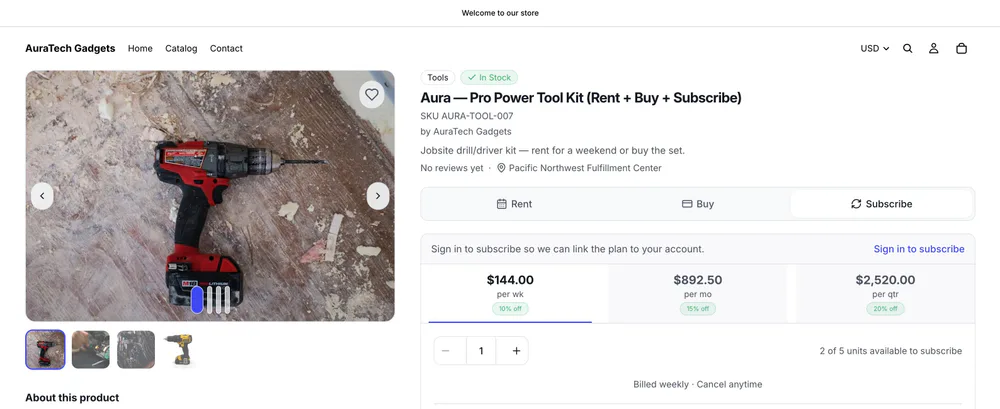
Product page Subscribe tab with weekly, monthly and quarterly plans, each with its price per cycle, discount badge and units free to subscribe

01See it in action

See subscription rental plans in the admin

A short walkthrough in the Rental Suite admin, with voiceover. It plays muted; press Play with sound to hear it from the start.

Read the setup guide

02Overview

Subscription rental plans in Rental Suite

Subscription rental plans turn a repeat rental into one booking that renews on its own. In Rental Suite you add them to a product on its Details & Pricing step: one plan for each billing cycle you offer, weekly, bi-weekly, monthly or quarterly.

Each plan is either priced on Auto, which takes your rental rate for that cycle and removes the plan's discount, or given a fixed price per cycle. The plans show as tabs on the product page's Subscribe tab and as plan cards in New Booking, and Rental Suite saves them to the product as Shopify selling plans so checkout can bill them on a schedule.

From a weekly rental subscription to a quarterly plan

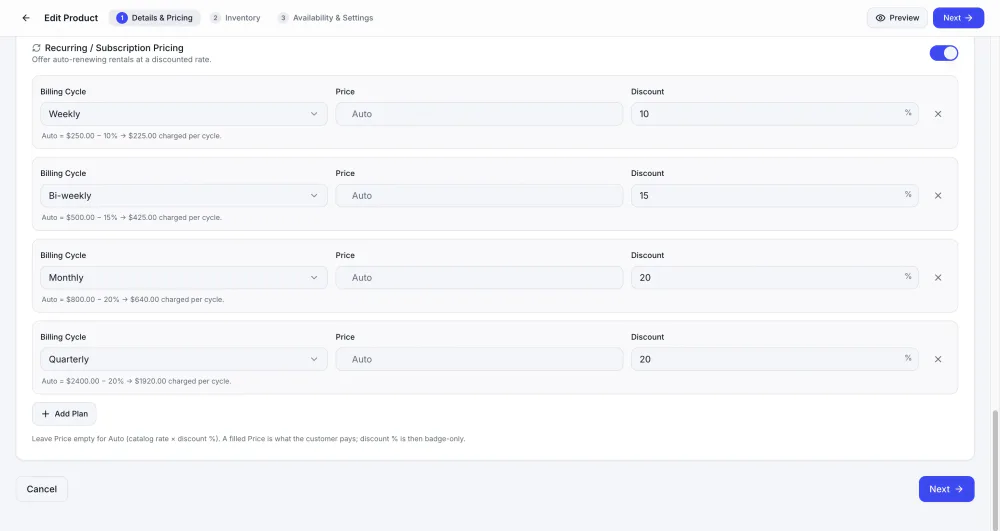
Switch on Recurring / Subscription Pricing on the product's Details & Pricing step, then add a plan for each billing cycle you want to sell: Weekly, Bi-weekly, Monthly or Quarterly. A new plan starts as quarterly at 20% off, so change the cycle, price and discount to suit the item.

A weekly rental subscription suits gear people need for a project. Monthly and quarterly plans suit kit that stays with one customer for a season. You can offer several cycles on the same product, and it needs at least one plan while the switch is on.
Rental Suite
Product editor with Recurring and Subscription Pricing on and four Auto-priced plans: weekly 10% off, bi-weekly 15%, monthly 20% and quarterly 20%

Subscription rental plans priced on Auto

Leave Price empty and the plan is priced on Auto: Rental Suite takes your rental rate for that cycle and removes the plan's discount. The form shows the working under each plan, so a $250.00 weekly rate with 10% off reads as $225.00 charged per cycle.

  • Weekly uses your weekly rate.
  • Bi-weekly uses twice the weekly rate.
  • Monthly uses your monthly rate.
  • Quarterly uses three times the monthly rate.

If the product has no weekly or monthly rate, Auto uses the daily rate times the days in the cycle instead: 7, 14, 30 or 90.

Or charge a fixed price per cycle

Type a Price and that's what the customer pays each cycle, whatever your rental rates say. The discount you enter then only shows as a badge, such as "15% off", on the plan tab and in New Booking, so set it to match the saving you're really giving.

Rental Suite won't save a plan that works out at $0 a cycle, for example an Auto plan on a product with no rental rates. The form marks the plan that needs a price or a rate.

What shoppers see on the product page

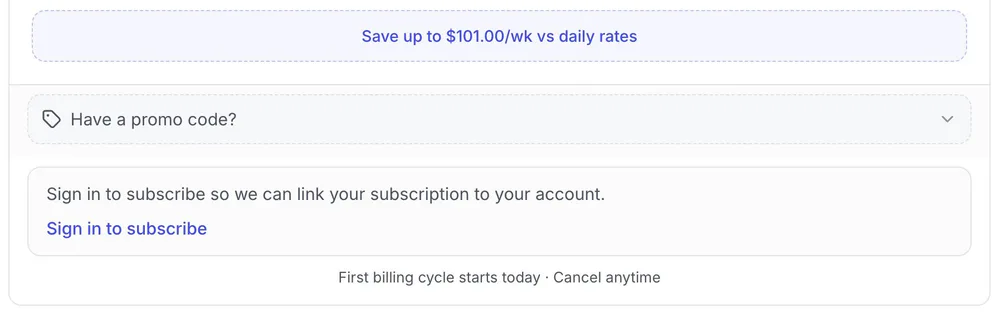
The Subscribe tab shows one tab per plan with its price per cycle and discount, the units free to subscribe and how often it's billed. Under the plan, Rental Suite compares the price with your daily rate over the same number of days and shows the saving, such as "Save up to $101.00/wk vs daily rates". A promo code box sits underneath.

Shoppers sign in to subscribe, so the plan is linked to their customer account, and the first billing cycle starts on the day they check out.

Rental Suite
Subscribe tab with the saving against daily rates, a promo code field, the sign-in prompt and First billing cycle starts today

Sell a plan from New Booking

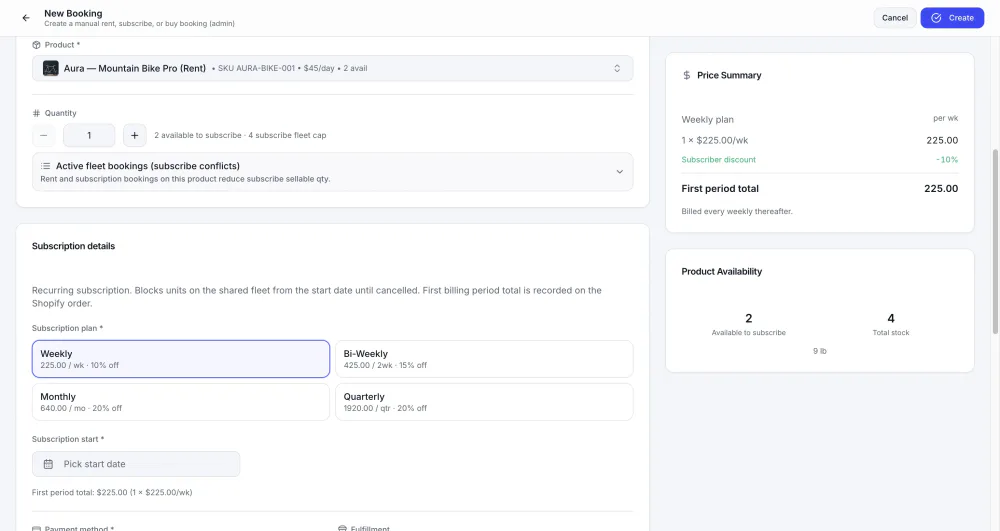
For phone and counter sales, open Bookings › New Booking and choose Subscribe. The product's plans show as cards with their price and discount, the price summary shows the subscriber discount and the first period total, and quantity is capped by the units free to subscribe.

Here you pick the start date yourself, and the first period total goes on the Shopify order. Later cycles of a subscription made in New Booking aren't charged automatically: automatic renewals need the plan to be bought through checkout.

Rental Suite
New Booking in Subscribe mode with weekly, bi-weekly, monthly and quarterly plan cards, the 10% subscriber discount and a $225.00 first period total

03How it works

Set up subscription rental plans in 4 steps

The steps a merchant takes in the Rental Suite admin, in order.

Read the setup guide

  1. Open the product

    In Rental Suite, open Products, edit the item and go to Details & Pricing.

  2. Switch on subscription pricing

    Turn on Recurring / Subscription Pricing. The Subscribe option needs the Standard plan or higher.

  3. Add a plan per cycle

    Pick the billing cycle, then leave Price on Auto with a discount, or type a fixed price.

  4. Save and preview

    Save the product, then use Preview to check the Subscribe tab before shoppers see it.

05Get started

Try subscription rental plans on your store

Install Rental Suite, then turn on subscription rental plans in the admin. The setup guide walks through each screen.

06FAQ

Subscription rental plans questions

Answers to common questions about subscription rental plans in Rental Suite.

Still have questions?

Ask the team that builds the app. We reply within one business day.

What is a subscription rental plan?

It's a price for keeping an item on a repeating billing cycle instead of for set dates. In Rental Suite each plan has a cycle (weekly, bi-weekly, monthly or quarterly) and either a discount off your rental rate or a fixed price.

Can I offer a weekly and a monthly rental subscription on the same product?

Yes. Add one plan per cycle. Shoppers choose between them on the Subscribe tab, and you choose in New Booking.

How is an Auto plan priced?

An Auto plan takes your rental rate for the cycle and removes the discount: the weekly rate for weekly, twice that for bi-weekly, the monthly rate for monthly and three times it for quarterly. Without weekly or monthly rates it uses the daily rate times 7, 14, 30 or 90 days.

Can shoppers choose a start date?

No. On the product page the first billing cycle starts on the day of checkout. In New Booking you pick the start date for the customer.

Which Rental Suite plans include subscriptions?

Standard, Growth and Enterprise, each with a 14-day free trial. On the Free plan you can't switch on subscription pricing and the Subscribe tab doesn't show.