Bookings and calendar

A printable rental invoice for phone and walk-in bookings

A customer who books by phone still wants something on paper. Rental Suite builds a rental invoice from the booking itself, so you can print it or save a PDF without retyping dates, units or prices.

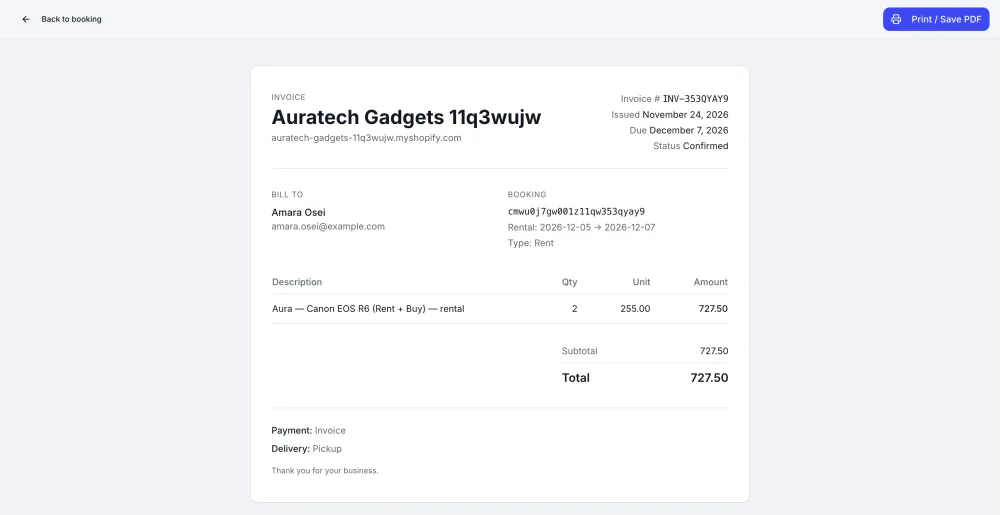
Rental invoice for a two-unit camera rental with the bill-to customer, rental dates, one line item, subtotal, total and the Print or Save PDF button

01See it in action

See rental invoices in the admin

A short walkthrough in the Rental Suite admin, with voiceover. It plays muted; press Play with sound to hear it from the start.

Read the setup guide

02Overview

Rental invoices in Rental Suite

A rental invoice tells the customer what they're renting, for which dates and what they owe. In Rental Suite you don't fill one in: every booking you create in the admin, whether a phone booking, a walk-in or a converted quote, has an Invoice button that opens one ready to print.

The invoice pulls the customer, rental dates, units, payment method and total from the booking, plus any promo code used. It has one fixed layout, so there's no template to set up first.

Bookings paid through your online checkout already have their order in your Shopify admin, which is where their receipt comes from. The invoice is for the bookings your team makes.

What's on a rental invoice

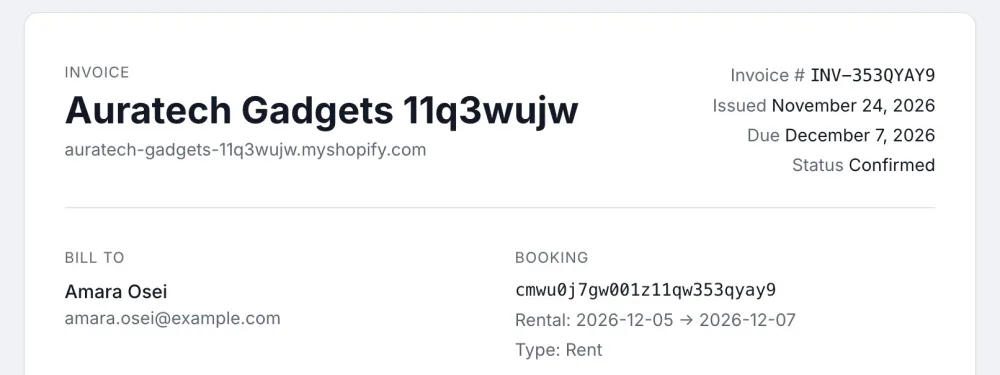
The top of the invoice carries your store name, an invoice number built from the booking ID (such as INV-353QYAY9), the issue date and a due date that matches the rental's end date. Below that sit the bill-to details and the booking itself.

At the bottom you'll find the payment method, the delivery method and any notes you added to the booking, then a short thank-you line.

  • Invoice number, issue date, due date and booking status
  • Bill to: customer name, email and phone
  • Booking ID, rental dates and booking type
  • Payment method, delivery method and notes
Rental Suite
Top of a rental invoice with the store name, invoice number, issue and due dates, status, bill-to customer and the booking dates

One line for the rental, then the total

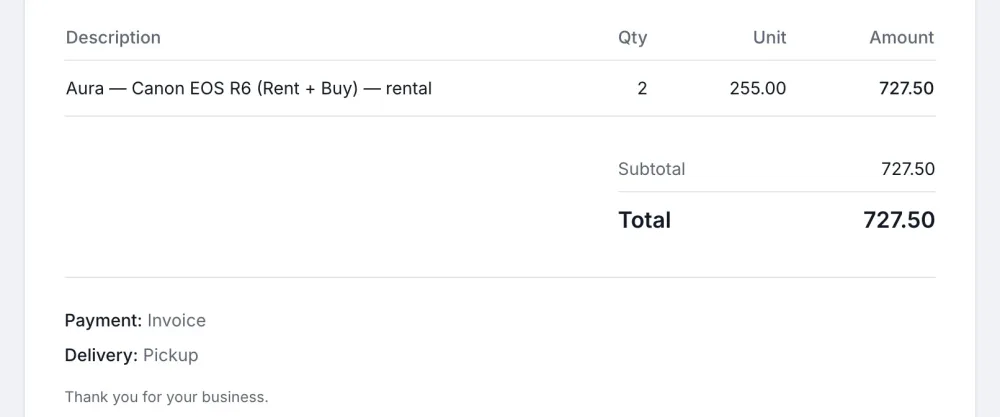
Each invoice has one line item: the product name (marked as a rental for dated rentals), the quantity, a unit price worked out from the product's daily rate and the rental days, and the amount. The amount and the total are the booking total, which already includes any security deposit and damage protection from the booking. They aren't listed as separate lines, so the quantity times the unit price won't always match the amount.

If a promo code was used, the invoice shows the subtotal, a Discount line with the code and the amount taken off, then the total. If your customer needs the deposit itemised, tell them the figure from the booking's price summary.

  • One line item: product, quantity, unit price and amount
  • Promo code shown on its own Discount line
  • Deposit and damage protection are inside the total
Rental Suite
Invoice line item for two cameras with quantity, unit price and amount, then the subtotal and total that include the deposit, and the payment and delivery methods

Open it from the booking page

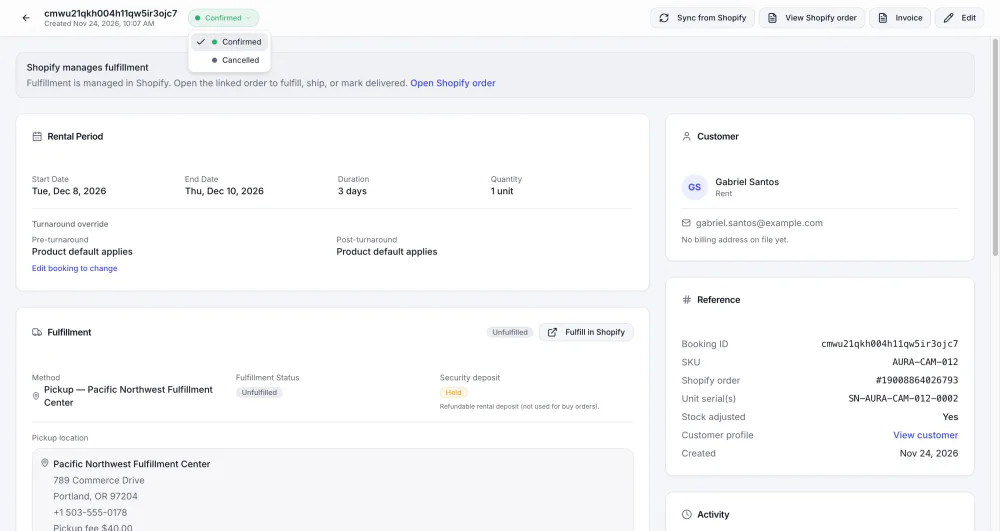
Open any booking you created in the admin and the Invoice button sits in the header, next to View Shopify order and Edit. It opens the invoice in a clean page with a Back to booking link, so you can check it against the booking before you print.

Rental Suite
Booking page header with the Invoice button next to Sync from Shopify, View Shopify order and Edit, above the rental period and fulfillment cards

Which bookings get an invoice

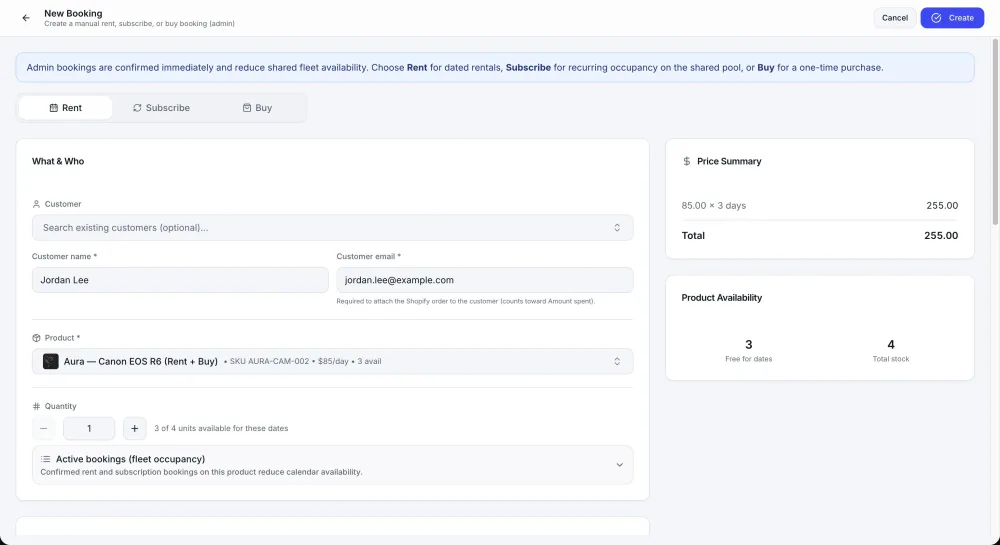
Invoices come from bookings made in New Booking: phone and walk-in rentals, bookings you take at an event and quotes you convert into a booking. Rent, Subscribe and Buy bookings all get one. A cancelled booking doesn't.

Bookings that came through your online checkout skip it: their order and payment record live in your Shopify admin, and the booking page links straight to that order.

Rental Suite
New Booking form in the admin with a customer, a camera, 3 of 4 units free for the dates and the price summary

Rental invoice software without a template to fill in

Print / Save PDF opens your browser's print dialog. Print it for the counter, or choose save as PDF and attach the file to your own email. The buttons drop out of the printout, so only the invoice is on the page.

Because the invoice reads the booking each time you open it, an edited booking (new dates or a changed quantity) prints with the new figures.

03How it works

Set up rental invoices in 4 steps

The steps a merchant takes in the Rental Suite admin, in order.

Read the setup guide

  1. Create the booking

    In Bookings, click New Booking, fill in the customer, product, dates and payment method, then Create.

  2. Open the booking

    Find it on the Rentals tab or the calendar and open it.

  3. Click Invoice

    The invoice opens with the customer, dates, line item and total filled in.

  4. Print or save a PDF

    Click Print / Save PDF, then print it or save the file and send it to your customer.

05Get started

Try rental invoices on your store

Install Rental Suite, then turn on rental invoices in the admin. The setup guide walks through each screen.

06FAQ

Rental invoices questions

Answers to common questions about rental invoices in Rental Suite.

Still have questions?

Ask the team that builds the app. We reply within one business day.

What should a rental invoice include?

The customer, what they're renting, the rental dates, the quantity, the price and the total due, plus a number and a date. Rental Suite's invoice has all of these, taken from the booking.

Does Rental Suite make invoices for online bookings?

No. Bookings paid through your online checkout already have an order in your Shopify admin, and the booking links to it. The invoice is for bookings you create in the admin.

Does the invoice list the security deposit separately?

No. The deposit and any damage protection are part of the booking total, which the invoice shows on one line. Besides the subtotal and total, a promo code is the only extra line.

Can I email the invoice from the app?

Not directly. Use Print / Save PDF to save the invoice as a PDF, then attach it to an email to your customer.

Can I add my logo or tax lines to the invoice?

Not today. The invoice has one fixed layout with your store name at the top, and the amounts come straight from the booking.