Use cases

Costume rental software with cleaning days built in

A costume comes back after the party and needs a wash before anyone else can wear it. Rental Suite counts each size, keeps cleaning days clear after every rental and lets customers rent an outfit or buy it.

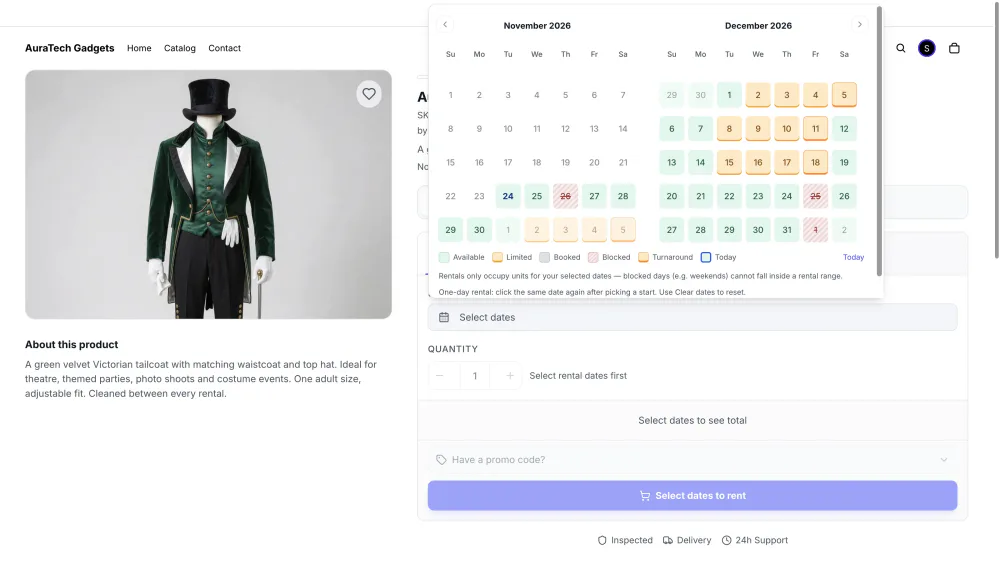
Victorian costume product page with the rental date picker open on December, showing limited days and a one-day cleaning turnaround

01See it in action

See how a costume rental shop runs in Rental Suite

A short walkthrough in the Rental Suite admin, with voiceover. It plays muted; press Play with sound to hear it from the start.

02Overview

Costume rental software that fits how you rent

A costume rental business rents the same outfit to a different person every week. The pirate captain in medium is booked for three parties in October, the large is free, and the one that came back on Sunday is still in the wash. Costume rental software has to know the count for each size, hold the cleaning days and keep a costume on the rail until it's ready.

Rental Suite turns your costume products into bookable rentals. Each costume and size is a product with a unit count, a daily rate, cleaning days before and after each rental, a deposit and an optional Buy price. Customers pick dates on the product page, and fittings in the shop book from the same counts.

The same setup works for dress, suit and formal wear rental.

04In practice

A day in a costume rental shop

Costume rental software that counts each size

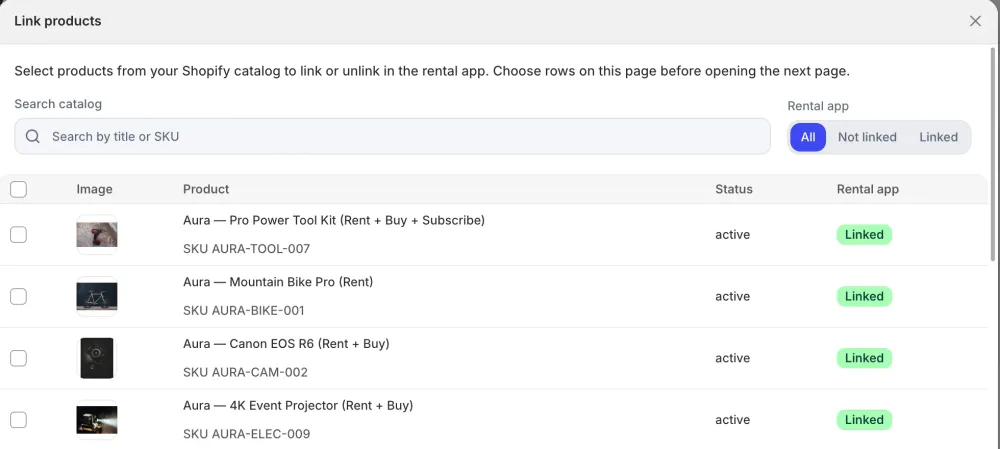
Open Link products in Rental Suite and choose the store products you rent. Rental Suite keeps one unit count per product rather than per variant, so give each size its own product: the pirate captain in medium with three units, the large with two. Each one gets its own date picker and count, and a bigger size can carry a higher price.

Put the measurements in the description, such as chest, waist and height, and list what's in the set under What's included: the hat, the sash, the boot covers. Customers know what they're getting, and staff have a list to check when the box comes back.

  • One product per costume and size
  • Measurements in the description
  • Hat, wig and props on the What's included list
Rental Suite
Link products dialog listing store products with their linked status and a search box

Clothing rental software with cleaning days between rentals

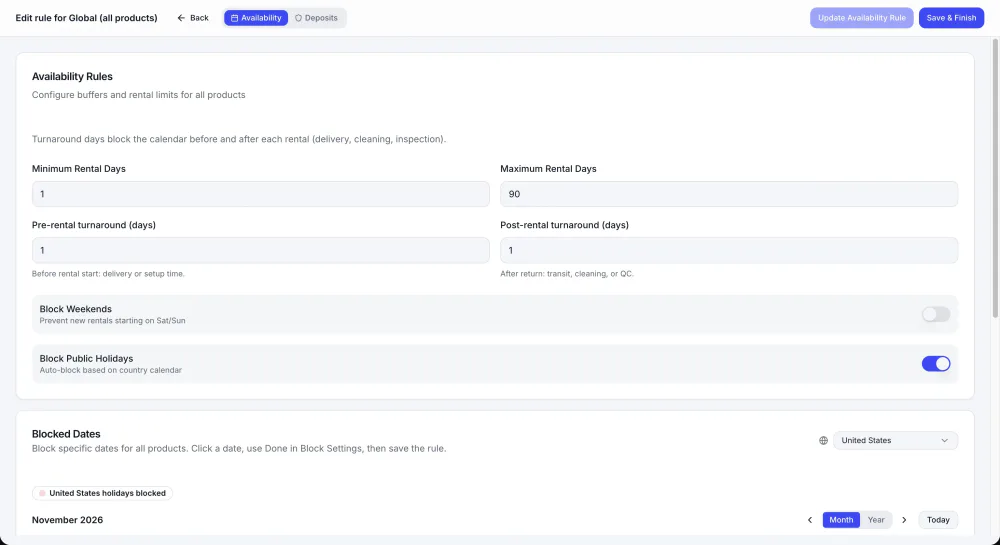
Set post-rental turnaround days for the time a costume spends being washed, dried and mended, and pre-rental days if you steam and check it the day before it goes out. Set them once in the shop-wide rule, then override them on pieces that take longer, such as a sequinned gown that goes to the dry cleaner.

Turnaround holds only the units that were on that rental. While one medium is in the wash, the other mediums stay bookable. When a costume is ready early, staff taking a booking in New Booking can switch off the turnaround for that one booking.

Rental Suite
Shop-wide availability rule with a 1 day minimum, a 90 day maximum, 1 turnaround day before and after each rental and public holidays blocked

Dress rental software with a Buy price next to Rent

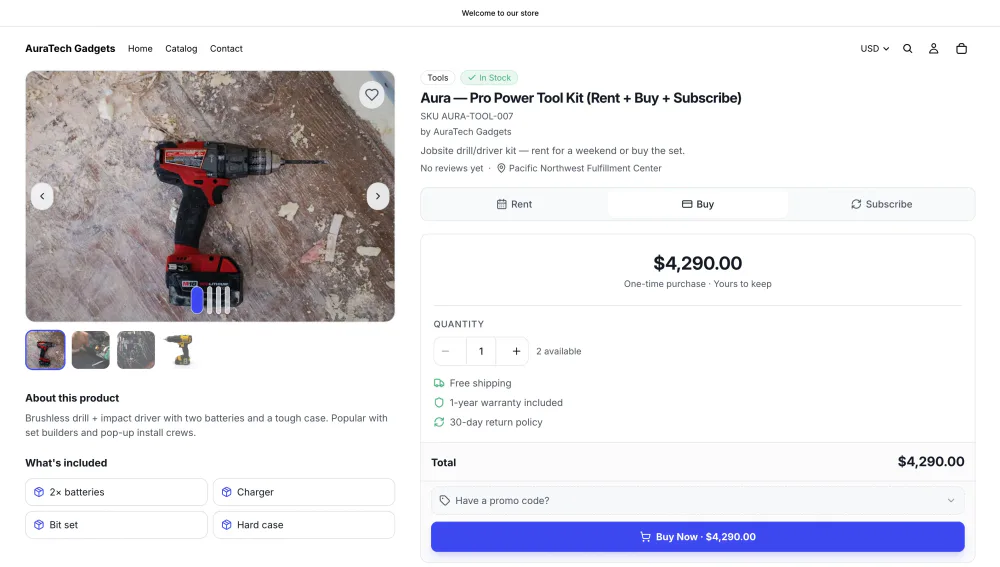
On a costume's Rental Pricing card, turn on Also available for purchase and enter a Buy price. The product page then shows a Buy tab beside Rent, with the price, a quantity and the units available. A sale takes that unit out of the rental stock, so it isn't offered for next weekend's parties.

If you track units by serial, mark the spare or older ones as Buy-only and they stay out of the rental pool until they're sold. Purchases don't count toward your plan's monthly booking limit; only confirmed rentals and subscriptions do.

Rental Suite
Buy tab on a rental product page with the one-time price, quantity, units available and a Buy Now button

Getting through the October rush

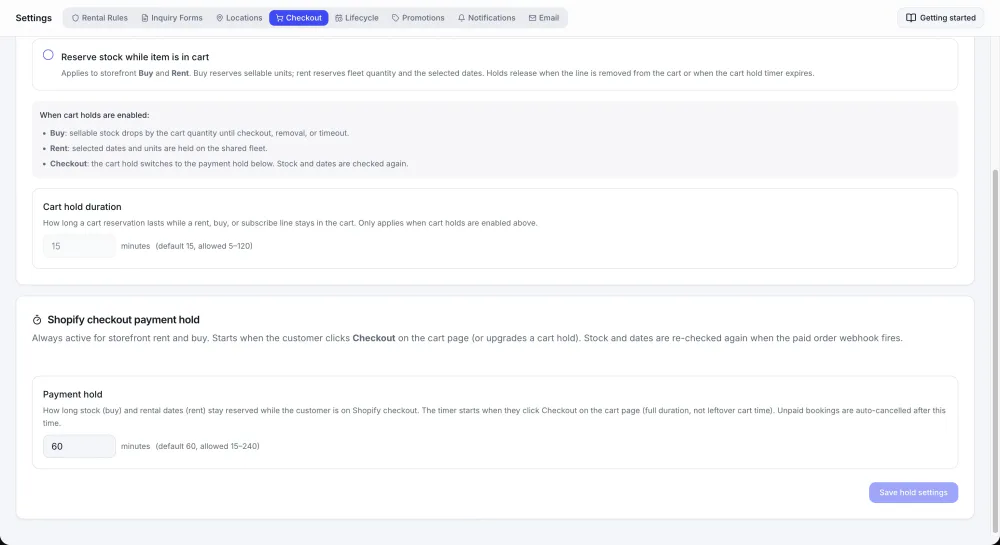
Customers see what's left for their dates as they pick them, and days when a size is fully booked show as booked. Once a customer reaches checkout, the units and dates are held for 60 minutes by default while they pay, so two parents can't buy the last dinosaur suit in medium at the same moment.

Block the days you don't hand out or take back costumes, such as the morning after Halloween, and no rental can include them. Fittings in the shop go through New Booking against the same counts.

Rental Suite
Checkout settings showing the 60 minute payment hold that keeps stock and dates reserved during checkout

Where Rental Suite stops for costume shops

Rentals are counted in whole calendar days, with no flat price per party: a Tuesday to Thursday rental is three days at your daily rate. Each booking covers one product, so a costume plus a separate wig is two bookings, unless you list the wig in the costume's set.

Rental Suite doesn't book fitting appointments, record alterations or add a cleaning charge. A deposit comes back in full when you mark the rental returned, so a charge for a ruined costume is agreed with the customer outside the app.

Rental Suite
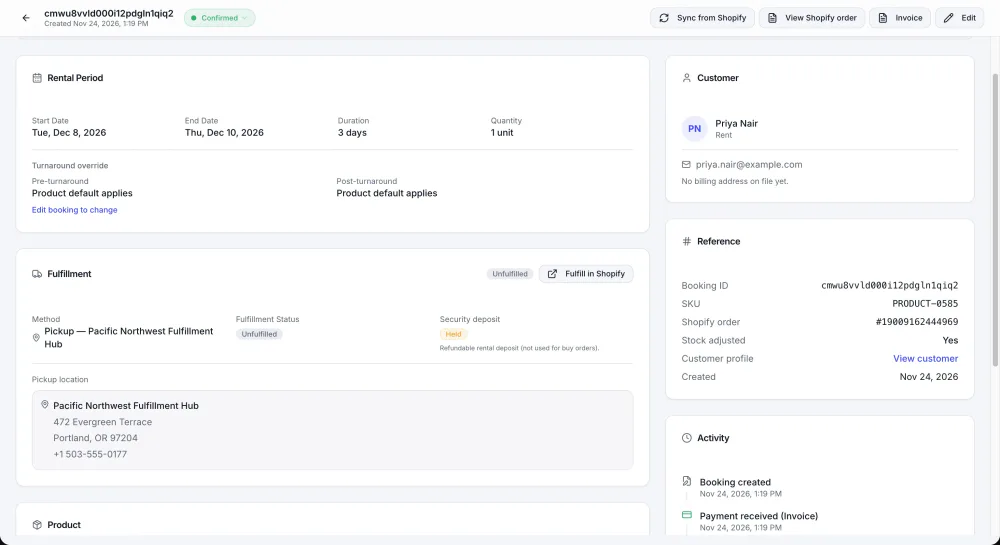
Booking detail for a Victorian gentleman costume rented Tuesday to Thursday for 3 days, confirmed, with the security deposit held and the pickup location

06How it works

Set up a costume rental shop in 5 steps

The order most shops follow in the Rental Suite admin.

  1. Add a product per size

    Link each costume, and each size of it, as a rental product and enter how many you own.

  2. Set cleaning days

    Choose the post-rental turnaround days your washing takes, shop-wide or per costume.

  3. Add a Buy price

    Turn on Also available for purchase on the costumes you're happy to sell.

  4. Set a deposit

    Pick a shop-wide deposit and raise it on the costumes that cost most to replace.

  5. Take the October bookings

    Customers book online and staff book fittings in New Booking; mark each costume returned when it's back from the party.

08Get started

Keep every costume clean and counted

Install Rental Suite, add your costumes size by size and set the cleaning days your laundry needs.

09FAQ

Costume rental software questions

Still have questions?

Ask the team that builds the app. We reply within one business day.

What is costume rental software?

Costume rental software tracks how many of each costume and size are free on each date, takes the booking and payment, and keeps cleaning time between rentals. Rental Suite does this in your online store.

How do I add cleaning time between costume rentals?

Set post-rental turnaround days on the costume or in the shop-wide rule. The units from each rental then stay off the calendar for those days after it ends.

Can I sell costumes as well as rent them?

Yes, on the same product page. Add a Buy price with Also available for purchase and shoppers choose between the Rent and Buy tabs, and purchases don't count toward your monthly booking limit.

Does Rental Suite work for formal wear and dress rental?

It covers the booking side: a product per size, cleaning days, deposits and a Buy option. It doesn't book fitting appointments or track alterations.

How big should a costume deposit be?

That's your call, based on what the costume costs to replace or repair. Rental Suite lets you set a percentage of the rental with a cap for the shop, and a different percentage or a fixed amount on any costume.