Use cases

Tool rental software that knows which drill went out

Tools come back muddy, late or missing a battery. Rental Suite tracks each tool by serial number, holds a deposit, lists what's in the kit and reminds customers before the return date.

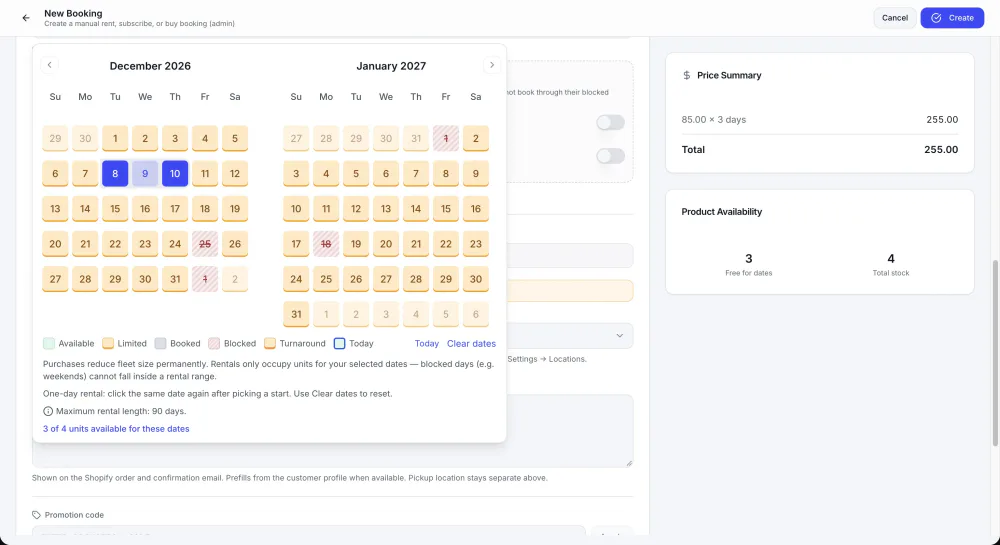
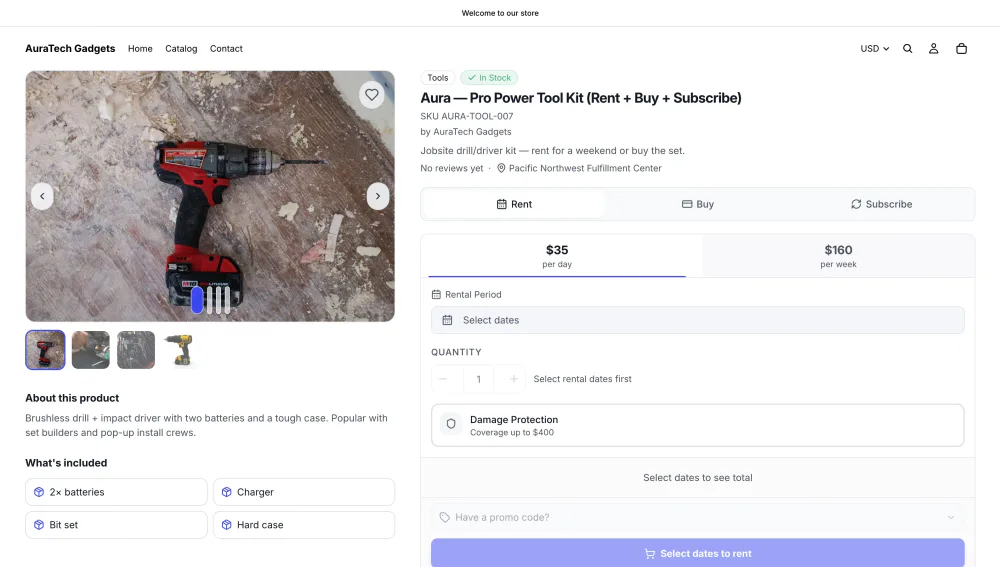
Power tool kit product page with Rent, Buy and Subscribe tabs, day and week rates, a Damage Protection option and a What's included list of batteries, charger, bit set and case

01See it in action

See how a tool rental shop runs in Rental Suite

A short walkthrough in the Rental Suite admin, with voiceover. It plays muted; press Play with sound to hear it from the start.

02Overview

Tool rental software that fits how you rent

Tool rental is a counter business with a website attached. A homeowner books a tile saw for Saturday online, a contractor rings for two breakers on Monday, and someone walks in wanting the pressure washer that's already out. Tool rental software has to answer all three from the same shelf and know which of your four identical drills each customer took.

Rental Suite adds rental booking to your online store: a date picker and live total on each product page, New Booking for the counter and the phone, and a serial number on every unit you choose to track.

Most tool hires are short, so the parts that matter are the deposit, the kit list, the handover and getting the tool back on time.

04In practice

A day in a tool rental shop

Tool rental software with a serial number on every unit

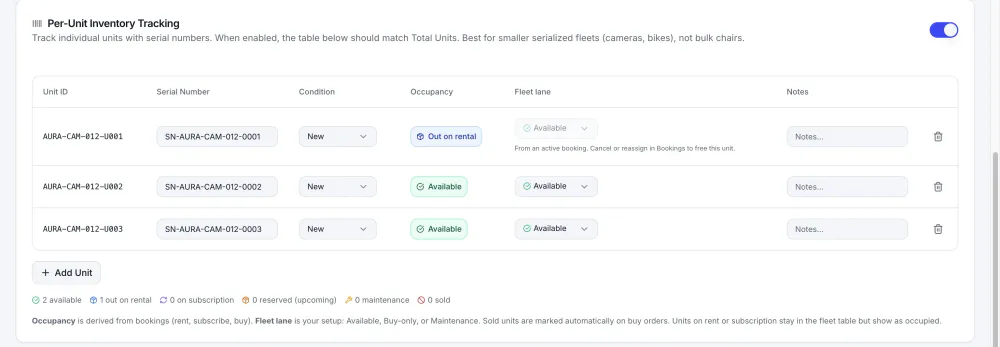
Switch on Per-Unit Inventory Tracking on a product and each drill, saw or sander gets its own row: a unit ID, the serial printed on the tool, a condition from New to Fair and a notes field for the slipping chuck or the replaced blade.

You don't record who has what. A unit on an upcoming booking shows Reserved for rental, then Out on rental once the dates start. When a tool needs repair, set it to the Maintenance lane and it stays out of rentals until you switch it back.

  • Unit ID, serial number, condition and notes per tool
  • Occupancy read from your bookings
  • Maintenance lane keeps a tool off the calendar
Rental Suite
Per-Unit Inventory Tracking table with a unit ID, serial number, condition, occupancy and fleet lane for each tracked unit

Counter and phone hires on the same calendar

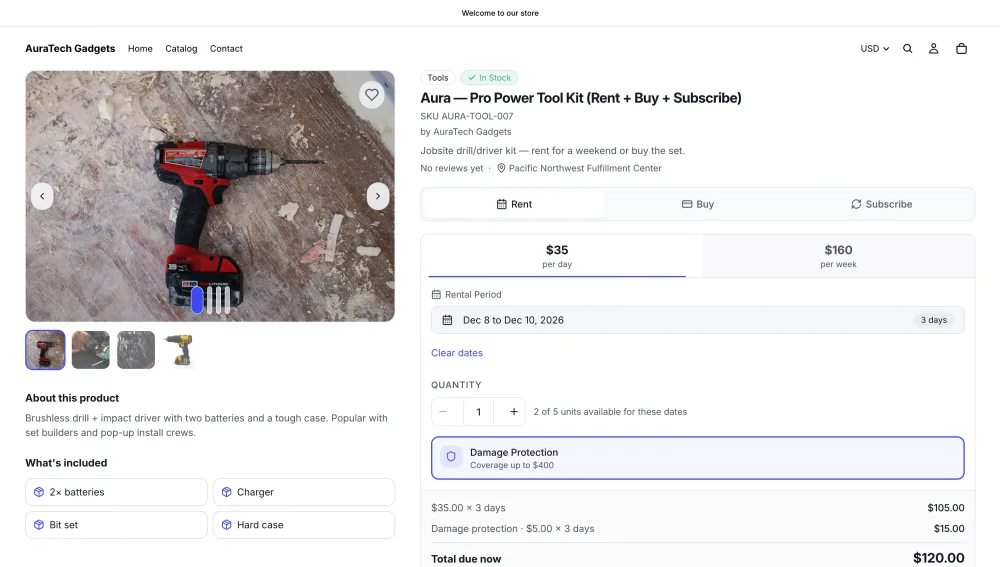
When someone walks in, open New Booking, pick the tool and the dates, and the date picker shows how many units are free. Turnaround days you set for cleaning or checks still apply, and you can skip them for one booking when a tool is ready early.

Leave Unit assignment empty and Rental Suite picks the first free unit, or search by serial and choose the exact tool you're handing over. Record how the customer paid: card, PayPal, cash or invoice.

Rental Suite
New Booking date picker in the admin with December 8 to 10 selected, blocked holidays and 3 of 4 units free

How to rent out tools with the kit list and protection up front

Each product has a What's included list on its page: two batteries, charger, bit set, hard case. Customers see what they're taking before they book, and your staff have a list to check at handover and again at return.

Under the rates sits Damage Protection if you offer it, with the coverage limit you set, and the security deposit is added to the total before checkout. Price both against what a typical repair or replacement costs you.

Rental Suite
Power tool kit product page with Damage Protection ticked, coverage up to 400 dollars and the fee added to the rental total

Tool returns, reminders and deposit refunds

Set the reminder day in Settings › Lifecycle, from the end date itself to 14 days before, and the customer gets the Return Reminder email. If a tool that's been picked up isn't back after the end date plus your grace days, the booking turns Overdue, the customer gets a notice and the unit stays blocked so the next hire isn't promised it.

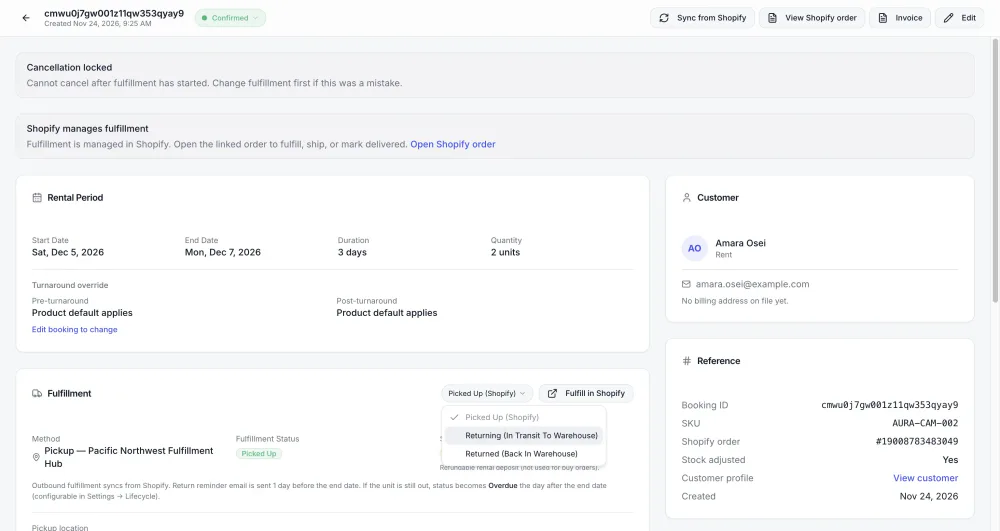
When the tool is back, set the booking's fulfillment to Returned. The unit goes back into stock, its serial is released and a held deposit is refunded in full.

Rental Suite
Booking detail with the Fulfillment menu open showing Picked Up, Returning in transit to warehouse and Returned back in warehouse

Limits to know for a tool hire counter

Rentals are priced in whole days: there are no hourly or half-day rates, and a hire from Friday to Sunday counts as three days. Rental Suite doesn't charge late fees; it marks the rental overdue and sends the notice, and any extra charge is yours to collect.

There's no waiver or ID check, no SMS reminder and no GPS. The full deposit is refunded on return, so a deduction for damage is settled outside the app.

06How it works

Set up a tool rental shop in 5 steps

The order most shops follow in the Rental Suite admin.

  1. Add your tools

    Link each tool or kit in Rental Suite, set Total Units and fill in the What's included list.

  2. Turn on serial tracking

    Switch on per-unit tracking for the tools you need to tell apart, and enter the serial printed on each.

  3. Set deposits and protection

    Choose a shop-wide deposit, override it on high-value tools, and set a daily damage protection fee and limit if you offer one.

  4. Set the reminder day

    Pick how many days before the end date the Return Reminder goes out, and the grace days before a hire counts as overdue.

  5. Hire and check in

    Book online or at the counter, mark the order picked up in your store admin, and mark the booking Returned when the tool is back.

08Get started

Know where every tool is

Install Rental Suite, add your first tool kit and take a hire from the product page or the counter.

09FAQ

Tool rental software questions

Still have questions?

Ask the team that builds the app. We reply within one business day.

What does tool rental software do?

It records which tools are free on which dates, takes bookings and payment, and tracks each tool until it's back. Rental Suite does that in your online store, with serial numbers per unit, deposits and return reminders.

How do I start a tool rental business online?

Start with the tools people already ask to borrow, price them by the day with a weekly rate for longer jobs, and decide on a deposit before the first hire. With Rental Suite each tool becomes a product page with a date picker, so customers can book and pay without calling.

Can I charge by the hour or half day?

No. Rental Suite prices rentals in whole days, with optional weekly and monthly rates, so a half-day hire is sold as one day.

Can I see which customer had a damaged tool?

Yes, if the tool is serial tracked. Each booking lists the serial it held, and the unit's notes keep its condition and repairs.

Does Rental Suite charge late fees?

No. A late hire turns Overdue, the customer gets an overdue notice and the tool stays blocked, but no fee is added. Collect any late charge yourself.

Can a contractor keep a tool for months?

Yes. Give the product a monthly rate, or turn on Subscribe so a regular keeps a kit on a weekly, bi-weekly, monthly or quarterly plan. Subscribe is on the Standard plan and up.